What makes a ML model a black-box? It is the interactions. Without any interactions, the ML model is additive and can be exactly described.
Studying interaction effects of ML models is challenging. The main XAI approaches are:
Looking at ICE plots, stratified PDP, and/or 2D PDP.
Study vertical scatter in SHAP dependence plots, or even consider SHAP interaction values.
Check partial-dependence based H-statistics introduced in Friedman and Popescu (2008), or related statistics.
This post is mainly about the third approach. Its beauty is that we get information about all interactions. The downside: it is as good/bad as partial dependence functions. And: the statistics are computationally very expensive to compute (of order n^2).
Different R packages offer some of these H-statistics, including {iml}, {gbm}, {flashlight}, and {vivid}. They all have their limitations. This is why I wrote the new R package {hstats}:
It is very efficient.
Has a clean API. DALEX explainers and meta-learners (mlr3, Tidymodels, caret) work out-of-the-box.
Supports multivariate predictions, including classification models.
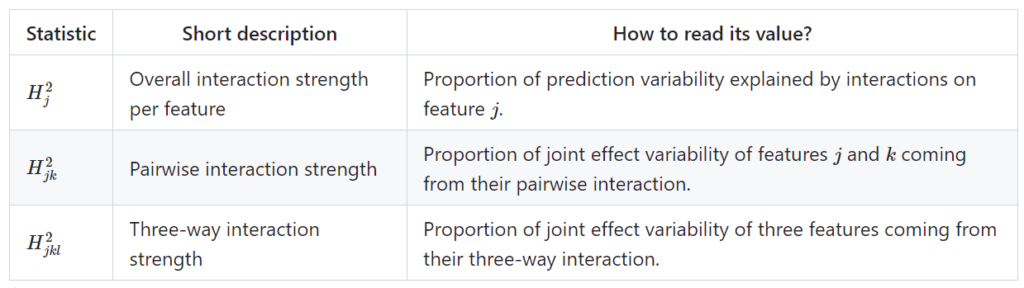
Allows to calculate unnormalized H-statistics. They help to compare pairwise and three-way statistics.
Contains fast multivariate ICE/PDPs with optional grouping variable.
In Python, there is the very interesting project artemis. I will write a post on it later.
Statistics supported by {hstats}
Furthermore, a global measure of non-additivity (proportion of prediction variability unexplained by main effects), and a measure of feature importance is available. For technical details and references, check the following pdf or github.
Classification example
Let’s fit a probability random forest on iris species.
R
library(ranger)
library(ggplot2)
library(hstats)

v <- setdiff(colnames(iris), "Species")
fit <- ranger(Species ~ ., data = iris, probability = TRUE, seed = 1)
s <- hstats(fit, v = v, X = iris)  # 8 seconds run-time
s
# Proportion of prediction variability unexplained by main effects of v:
#      setosa  versicolor   virginica
# 0.002705945 0.065629375 0.046742035

plot(s, normalize = FALSE, squared = FALSE) +
  ggtitle("Unnormalized statistics") +
  scale_fill_viridis_d(begin = 0.1, end = 0.9)

ice(fit, v = "Petal.Length", X = iris, BY = "Petal.Width", n_max = 150) |>
  plot(center = TRUE) +
  ggtitle("Centered ICE plots")
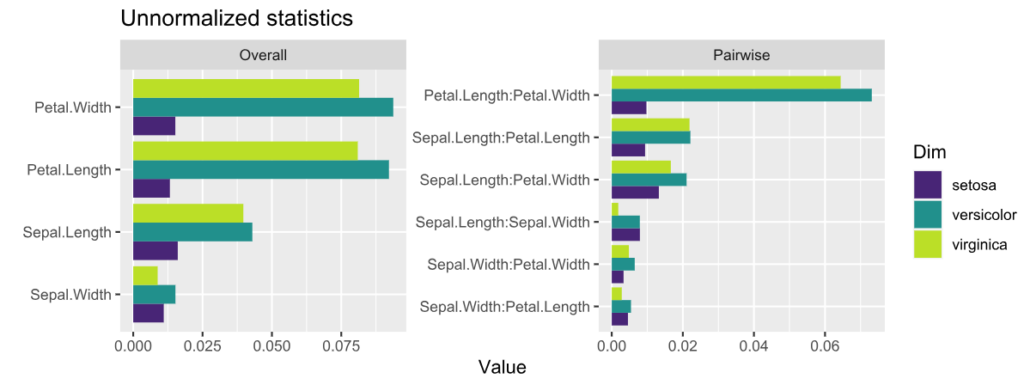
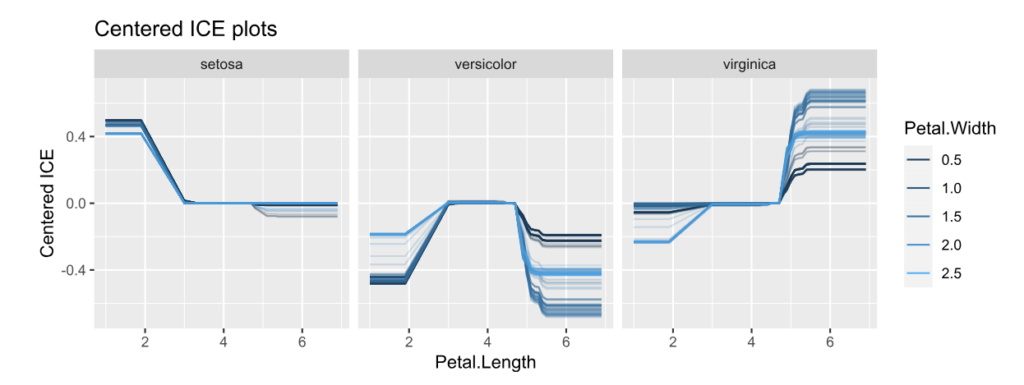
Unnormalized H-statistics, i.e., values are roughly on the scale of the predictions (here: probabilities).Centered ICE plots per class.
Interpretation:
The features with strongest interactions are Petal Length and Petal Width. These interactions mainly affect species “virginica” and “versicolor”. The effect for “setosa” is almost additive.
Unnormalized pairwise statistics show that the strongest absolute interaction happens indeed between Petal Length and Petal Width.
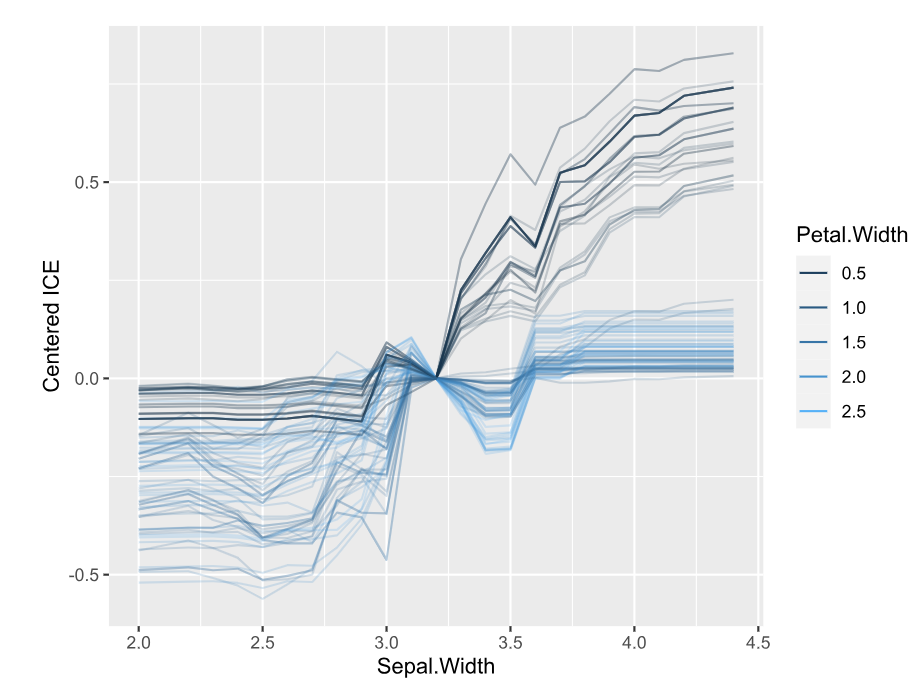
The centered ICE plots shows how the interaction manifests: The effect of Petal Length heavily depends on Petal Width, except for species “setosa”. Would a SHAP analysis show the same?
DALEX example
Here, we consider a random forest regression on “Sepal.Length”.
library(DALEX)
library(ranger)
library(hstats)

set.seed(1)

fit <- ranger(Sepal.Length ~ ., data = iris)
ex <- explain(fit, data = iris[-1], y = iris[, 1])

s <- hstats(ex)  # 2 seconds
s  # Non-additivity index 0.054
plot(s)
plot(ice(ex, v = "Sepal.Width", BY = "Petal.Width"), center = TRUE)
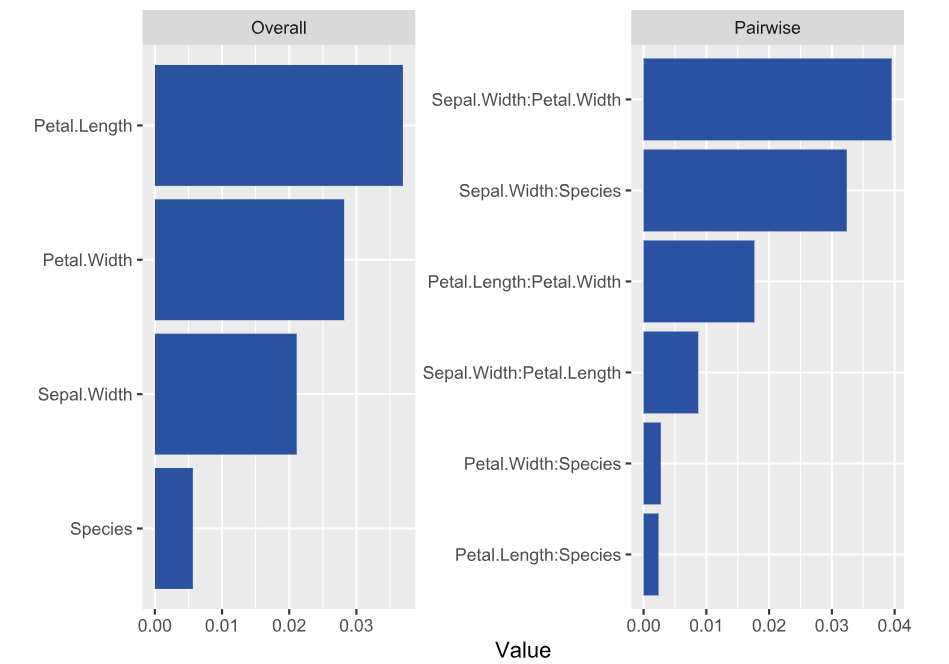
H-statisticsCentered ICE plot of strongest relative interactions.
Interpretation
Petal Length and Width show the strongest overall associations. Since we are considering normalized statistics, we can say: “About 3.5% of prediction variability comes from interactions with Petal Length”.
The strongest relative pairwise interaction happens between Sepal Width and Petal Width: Again, because we study normalized H-statistics, we can say: “About 4% of total prediction variability of the two features Sepal Width and Petal Width can be attributed to their interactions.”
Overall, all interactions explain only about 5% of prediction variability (see text output).
Try it out!
The complete R script can be found here. More examples and background can be found on the Github page of the project.
This is the next article in our series “Lost in Translation between R and Python”. The aim of this series is to provide high-quality R and Python code to achieve some non-trivial tasks. If you are to learn R, check out the R tab below. Similarly, if you are to learn Python, the Python tab will be your friend.
This post is heavily based on the new {shapviz} vignette.
Setting
Besides other features, a model with geographic components contains features like
latitude and longitude,
postal code, and/or
other features that depend on location, e.g., distance to next restaurant.
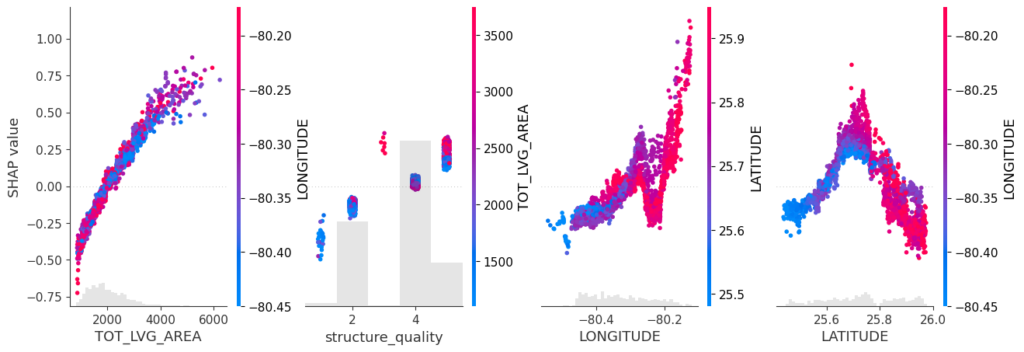
Like any feature, the effect of a single geographic feature can be described using SHAP dependence plots. However, studying the effect of latitude (or any other location dependent feature) alone is often not very illuminating – simply due to strong interaction effects and correlations with other geographic features.
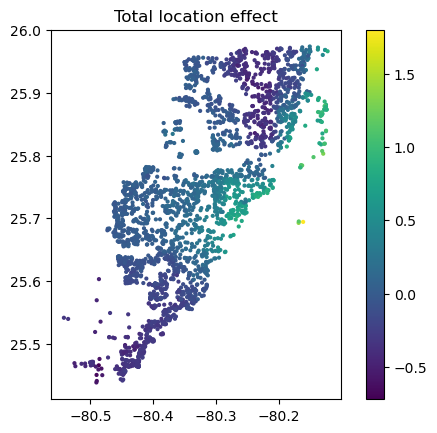
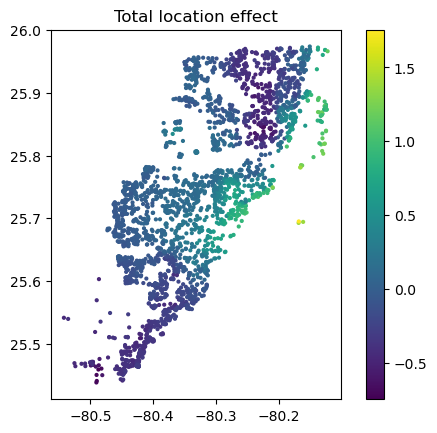
That’s where the additivity of SHAP values comes into play: The sum of SHAP values of all geographic components represent the total geographic effect, and this sum can be visualized as a heatmap or 3D scatterplot against latitude/longitude (or any other geographic representation).
A first example
For illustration, we will use a beautiful house price dataset containing information on about 14’000 houses sold in 2016 in Miami-Dade County. Some of the columns are as follows:
SALE_PRC: Sale price in USD: Its logarithm will be our model response.
LATITUDE, LONGITUDE: Coordinates
CNTR_DIST: Distance to central business district
OCEAN_DIST: Distance (ft) to the ocean
RAIL_DIST: Distance (ft) to the next railway track
HWY_DIST: Distance (ft) to next highway
TOT_LVG_AREA: Living area in square feet
LND_SQFOOT: Land area in square feet
structure_quality: Measure of building quality (1: worst to 5: best)
age: Age of the building in years
(Italic features are geographic components.) For more background on this dataset, see Mayer et al [2].
We will fit an XGBoost model to explain log(price) as a function of lat/long, size, and quality/age.
R
Python
devtools::install_github("ModelOriented/shapviz", dependencies = TRUE)
library(xgboost)
library(ggplot2)
library(shapviz)  # Needs development version 0.9.0 from github

head(miami)

x_coord <- c("LATITUDE", "LONGITUDE")
x_nongeo <- c("TOT_LVG_AREA", "LND_SQFOOT", "structure_quality", "age")
x <- c(x_coord, x_nongeo)

# Train/valid split
set.seed(1)
ix <- sample(nrow(miami), 0.8 * nrow(miami))
X_train <- data.matrix(miami[ix, x])
X_valid <- data.matrix(miami[-ix, x])
y_train <- log(miami$SALE_PRC[ix])
y_valid <- log(miami$SALE_PRC[-ix])

# Fit XGBoost model with early stopping
dtrain <- xgb.DMatrix(X_train, label = y_train)
dvalid <- xgb.DMatrix(X_valid, label = y_valid)

params <- list(learning_rate = 0.2, objective = "reg:squarederror", max_depth = 5)

fit <- xgb.train(
  params = params,
  data = dtrain,
  watchlist = list(valid = dvalid),
  early_stopping_rounds = 20,
  nrounds = 1000,
  callbacks = list(cb.print.evaluation(period = 100))
)
%load_ext lab_black

import numpy as np
import matplotlib.pyplot as plt
from sklearn.datasets import fetch_openml

df = fetch_openml(data_id=43093, as_frame=True)
X, y = df.data, np.log(df.target)
X.head()

# Data split and model
from sklearn.model_selection import train_test_split
import xgboost as xgb

x_coord = ["LONGITUDE", "LATITUDE"]
x_nongeo = ["TOT_LVG_AREA", "LND_SQFOOT", "structure_quality", "age"]
x = x_coord + x_nongeo

X_train, X_valid, y_train, y_valid = train_test_split(
    X[x], y, test_size=0.2, random_state=30
)

# Fit XGBoost model with early stopping
dtrain = xgb.DMatrix(X_train, label=y_train)
dvalid = xgb.DMatrix(X_valid, label=y_valid)

params = dict(learning_rate=0.2, objective="reg:squarederror", max_depth=5)

fit = xgb.train(
    params=params,
    dtrain=dtrain,
    evals=[(dvalid, "valid")],
    verbose_eval=100,
    early_stopping_rounds=20,
    num_boost_round=1000,
)
SHAP dependence plots
Let’s first study selected SHAP dependence plots, evaluated on the validation dataset with around 2800 observations. Note that we could as well use the training data for this purpose, but it is a bit large.
Sum of SHAP values on color scale against coordinates (Python output).
The last plot gives a good impression on price levels, but note:
Since we have modeled logarithmic prices, the effects are on relative scale (0.1 means about 10% above average).
Due to interaction effects with non-geographic components, the location effects might depend on features like living area. This is not visible in above plot. We will modify the model now to improve this aspect.
Two modifications
We will now change above model in two ways, not unlike the model in Mayer et al [2].
We will use additional geographic features like distance to railway track or to the ocean.
We will use interaction constraints to allow only interactions between geographic features.
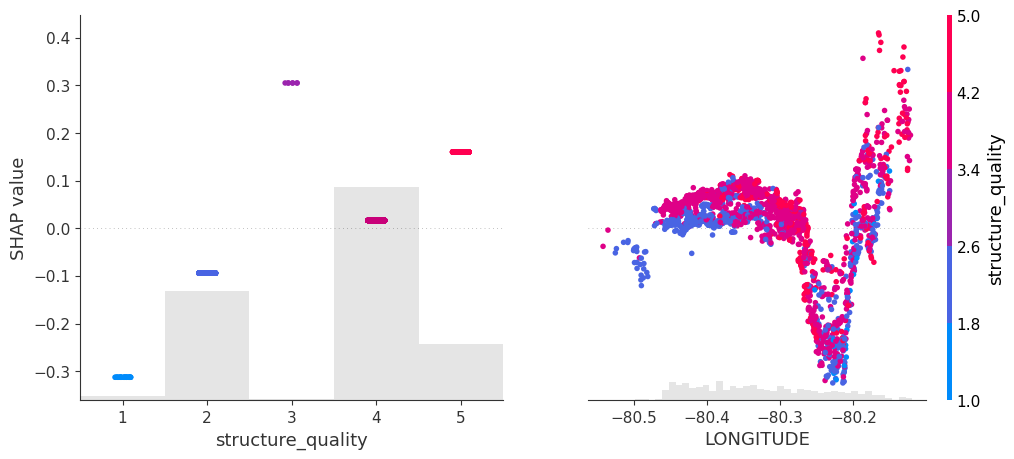
The second step leads to a model that is additive in each non-geographic component and also additive in the combined location effect. According to the technical report of Mayer [1], SHAP dependence plots of additive components in a boosted trees model are shifted versions of corresponding partial dependence plots (evaluated at observed values). This allows a “Ceteris Paribus” interpretation of SHAP dependence plots of corresponding components.
R
Python
# Extend the feature set
more_geo <- c("CNTR_DIST", "OCEAN_DIST", "RAIL_DIST", "HWY_DIST")
x2 <- c(x, more_geo)

X_train2 <- data.matrix(miami[ix, x2])
X_valid2 <- data.matrix(miami[-ix, x2])

dtrain2 <- xgb.DMatrix(X_train2, label = y_train)
dvalid2 <- xgb.DMatrix(X_valid2, label = y_valid)

# Build interaction constraint vector
ic <- c(
  list(which(x2 %in% c(x_coord, more_geo)) - 1),
  as.list(which(x2 %in% x_nongeo) - 1)
)

# Modify parameters
params$interaction_constraints <- ic

fit2 <- xgb.train(
  params = params,
  data = dtrain2,
  watchlist = list(valid = dvalid2),
  early_stopping_rounds = 20,
  nrounds = 1000,
  callbacks = list(cb.print.evaluation(period = 100))
)

# SHAP analysis
sv2 <- shapviz(fit2, X_pred = X_valid2)

# Two selected features: Thanks to additivity, structure_quality can be read as
# Ceteris Paribus
sv_dependence(sv2, v = c("structure_quality", "LONGITUDE"), alpha = 0.2)

# Total geographic effect (Ceteris Paribus thanks to additivity)
sv_dependence2D(sv2, x = "LONGITUDE", y = "LATITUDE", add_vars = more_geo) +
  coord_equal()
# Extend the feature set
more_geo = ["CNTR_DIST", "OCEAN_DIST", "RAIL_DIST", "HWY_DIST"]
x2 = x + more_geo

X_train2, X_valid2 = train_test_split(X[x2], test_size=0.2, random_state=30)

dtrain2 = xgb.DMatrix(X_train2, label=y_train)
dvalid2 = xgb.DMatrix(X_valid2, label=y_valid)

# Build interaction constraint vector
ic = [x_coord + more_geo, *[[z] for z in x_nongeo]]

# Modify parameters
params["interaction_constraints"] = ic

fit2 = xgb.train(
    params=params,
    dtrain=dtrain2,
    evals=[(dvalid2, "valid")],
    verbose_eval=100,
    early_stopping_rounds=20,
    num_boost_round=1000,
)

# SHAP analysis
xgb_explainer2 = shap.Explainer(fit2)
shap_values2 = xgb_explainer2(X_valid2)

v = ["structure_quality", "LONGITUDE"]
shap.plots.scatter(shap_values2[:, v], color=shap_values2[:, v])

# Total location effect
shap_coord2 = shap_values2[:, x_coord]
c = shap_values2[:, x_coord + more_geo].values.sum(axis=1)
plt.scatter(*list(shap_coord2.data.T), c=c, s=4)
ax = plt.gca()
ax.set_aspect("equal", adjustable="box")
plt.colorbar()
plt.title("Total location effect")
plt.show()
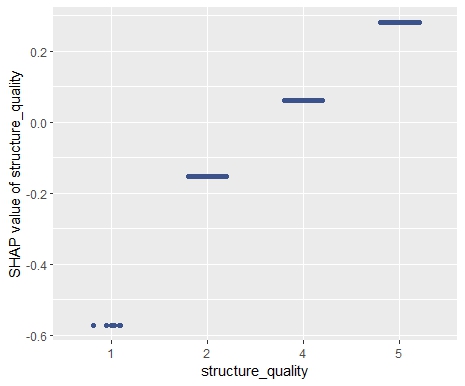
SHAP dependence plots of an additive feature (structure quality, no vertical scatter per unique feature value) and one of the geographic features (Python output).Sum of all geographic features (color) against coordinates. There are no interactions to non-geographic features, so the effect can be read Ceteris Paribus (Python output).
Again, the resulting total geographic effect looks reasonable.
Wrap-Up
SHAP values of all geographic components in a model can be summed up and plotted on the color scale against coordinates (or some other geographic representation). This gives a lightning fast impression of the location effects.
Interaction constraints between geographic and non-geographic features lead to Ceteris Paribus interpretation of total geographic effects.
Mayer, Michael, Steven C. Bourassa, Martin Hoesli, and Donato Flavio Scognamiglio. 2022. “Machine Learning Applications to Land and Structure Valuation.” Journal of Risk and Financial Management.
In this recent post, we have explained how to use Kernel SHAP for interpreting complex linear models. As plotting backend, we used our fresh CRAN package “shapviz“.
“shapviz” has direct connectors to a couple of packages such as XGBoost, LightGBM, H2O, kernelshap, and more. Multiple times people asked me how to combine shapviz when the XGBoost model was fitted with Tidymodels. The workflow was not 100% clear to me as well, but the answer is actually very simple, thanks to Julia’s post where the plots were made with SHAPforxgboost, another cool package for visualization of SHAP values.
Example with shiny diamonds
Step 1: Preprocessing
We first write the data preprocessing recipe and apply it to the data rows that we want to explain. In our case, its 1000 randomly sampled diamonds.
The next step is to tune and build the model. For simplicity, we skipped the tuning part. Bad, bad 🙂
R
# Just for illustration - in practice needs tuning!
xgboost_model <- boost_tree(
  mode = "regression",
  trees = 200,
  tree_depth = 5,
  learn_rate = 0.05,
  engine = "xgboost"
)

dia_wf <- workflow() %>%
  add_recipe(dia_recipe) %>%
  add_model(xgboost_model)

fit <- dia_wf %>%
  fit(diamonds)
Step 3: SHAP Analysis
We now need to call shapviz() on the fitted model. In order to have neat interpretations with the original factor labels, we not only pass the prediction data prepared in Step 1 via bake(), but also the original data structure.
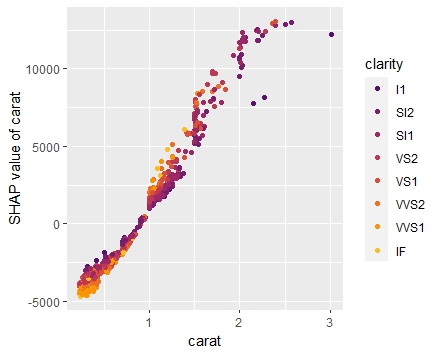
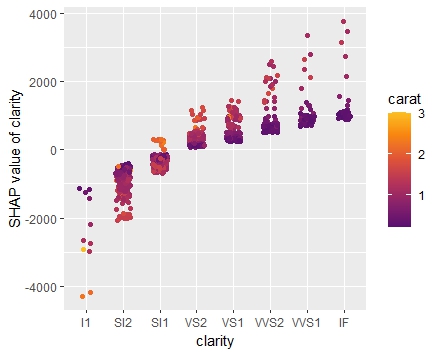
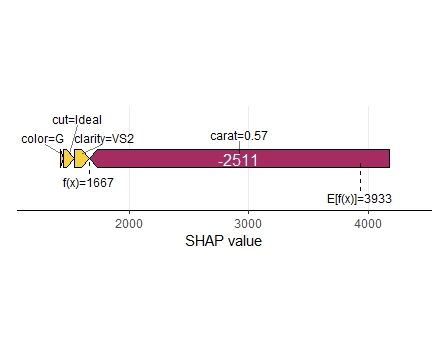
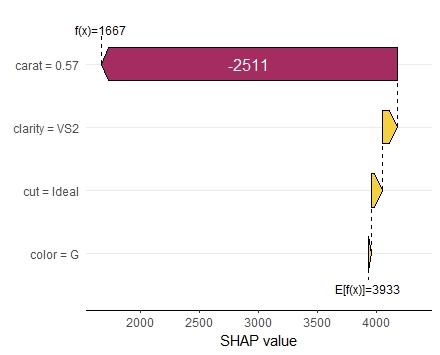
Variable importance plot overlaid with SHAP summary beeswarmsDependence plot for carat. Note that clarity is shown with original labels, not only integers.Dependence plot for clarity. Note again that the x-scale uses the original factor levels, not the integer encoded values.Force plot of the first observationWaterfall plot for the first observation
Summary
Making SHAP analyses with XGBoost Tidymodels is super easy.
One of the reasons why we love the “dplyr” package: it plays so well together with the forward pipe operator `%>%` from the “magrittr” package. Actually, it is not a coincidence that both packages were released quite at the same time, in 2014.
What does the pipe do? It puts the object on its left as the first argument into the function on its right: iris %>% head() is a funny way of writing head(iris). It helps to avoid long function chains like f(g(h(x))), or repeated assignments.
In 2021 and version 4.1, R has received its native forward pipe operator |> so that we can write nice code like this:
Imagine this without pipe…
Since version 4.2, the piped object can be referenced by the underscore _, but just once for now, see an example below.
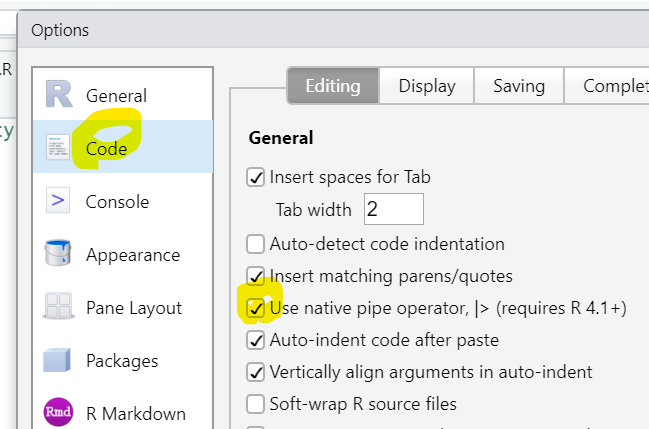
To use the native pipe via CTRL-SHIFT-M in Posit/RStudio, tick this:
Combined with the many great functions from the standard distribution of R, we can get a real “dplyr” feeling without even loading dplyr. Don’t get me wrong: I am a huge fan of the whole Tidyverse! But it is a great way to learn “Standard R”.
Data chains
Here a small selection of standard functions playing well together with the pipe: They take a data frame and return a modified data frame:
subset(): Select rows and columns of data frame
transform(): Add or overwrite columns in data frame
aggregate(): Grouped calculations
rbind(), cbind(): Bind rows/columns of data frame/matrix
merge(): Join data frames by key
head(), tail(): First/last few elements of object
reshape(): Transposition/Reshaping of data frame (no, I don’t understand the interface)
R
library(ggplot2)  # Need diamonds

# What does the native pipe do?
quote(diamonds |> head())

# OUTPUT
# head(diamonds)

# Grouped statistics
diamonds |>
  aggregate(cbind(price, carat) ~ color, FUN = mean)

# OUTPUT
#   color    price     carat
# 1     D 3169.954 0.6577948
# 2     E 3076.752 0.6578667
# 3     F 3724.886 0.7365385
# 4     G 3999.136 0.7711902
# 5     H 4486.669 0.9117991
# 6     I 5091.875 1.0269273
# 7     J 5323.818 1.1621368

# Join back grouped stats to relevant columns
diamonds |>
  subset(select = c(price, color, carat)) |>
  transform(price_per_color = ave(price, color)) |>
  head()

# OUTPUT
#   price color carat price_per_color
# 1   326     E  0.23        3076.752
# 2   326     E  0.21        3076.752
# 3   327     E  0.23        3076.752
# 4   334     I  0.29        5091.875
# 5   335     J  0.31        5323.818
# 6   336     J  0.24        5323.818

# Plot transformed values
diamonds |>
  transform(
    log_price = log(price),
    log_carat = log(carat)
  ) |>
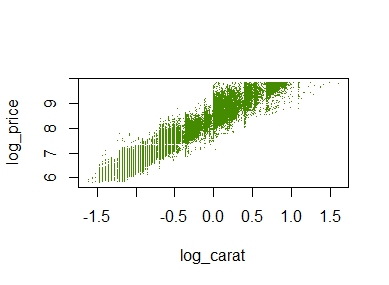
  plot(log_price ~ log_carat, col = "chartreuse4", pch = ".", data = _)
A simple scatterplot
The plot does not look quite as sexy as “ggplot2”, but its a start.
Other chains
The pipe not only works perfectly with functions that modify a data frame. It also shines with many other functions often applied in a nested way. Here two examples:
R
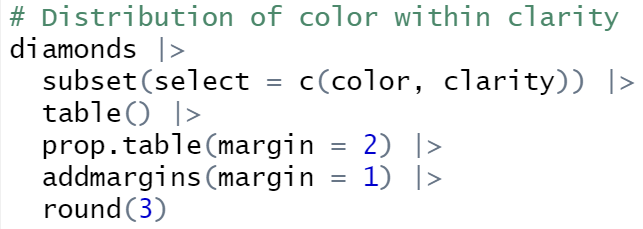
# Distribution of color within clarity
diamonds |>
  subset(select = c(color, clarity)) |>
  table() |>
  prop.table(margin = 2) |>
  addmargins(margin = 1) |>
  round(3)

# OUTPUT
# clarity
# color      I1   SI2   SI1   VS2   VS1  VVS2  VVS1    IF
#     D   0.057 0.149 0.159 0.138 0.086 0.109 0.069 0.041
#     E   0.138 0.186 0.186 0.202 0.157 0.196 0.179 0.088
#     F   0.193 0.175 0.163 0.180 0.167 0.192 0.201 0.215
#     G   0.202 0.168 0.151 0.191 0.263 0.285 0.273 0.380
#     H   0.219 0.170 0.174 0.134 0.143 0.120 0.160 0.167
#     I   0.124 0.099 0.109 0.095 0.118 0.072 0.097 0.080
#     J   0.067 0.052 0.057 0.060 0.066 0.026 0.020 0.028
#     Sum 1.000 1.000 1.000 1.000 1.000 1.000 1.000 1.000

# Barplot from discrete column
diamonds$color |>
  table() |>
  prop.table() |>
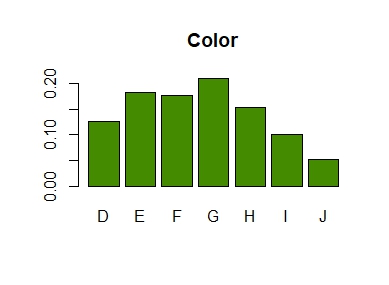
  barplot(col = "chartreuse4", main = "Color")
A linear model with complex interaction effects can be almost as opaque as a typical black-box like XGBoost.
XGBoost models are often interpreted with SHAP (Shapley Additive eXplanations): Each of e.g. 1000 randomly selected predictions is fairly decomposed into contributions of the features using the extremely fast TreeSHAP algorithm, providing a rich interpretation of the model as a whole. TreeSHAP was introduced in the Nature publication by Lundberg and Lee (2020).
Can we do the same for non-tree-based models like a complex GLM or a neural network? Yes, but we have to resort to slower model-agnostic SHAP algorithms:
“kernelshap” (Mayer and Watson) implements the Kernel SHAP algorithm by Lundberg and Lee (2017). It uses a constrained weighted regression to calculate the SHAP values of all features at the same time.
In the limit, the two algorithms provide the same SHAP values.
House prices
We will use a great dataset with 14’000 house prices sold in Miami in 2016. The dataset was kindly provided by Prof. Steven Bourassa for research purposes and can be found on OpenML.
The model
We will model house prices by a Gamma regression with log-link. The model includes factors, linear components and natural cubic splines. The relationship of living area and distance to central district is modeled by letting the spline bases of the two features interact.
Thanks to parallel processing and some implementation tricks, we were able to decompose 1000 predictions within 10 seconds! By default, kernelshap() uses exact calculations up to eight features (exact regarding the background data), which would need an infinite amount of Monte-Carlo-sampling steps.
Note that glm() has a very efficient predict() function. GAMs, neural networks, random forests etc. usually take more time, e.g. 5 minutes to do the crunching.
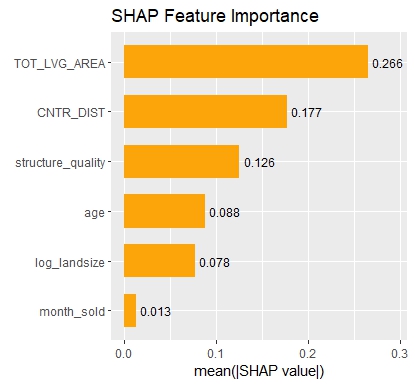
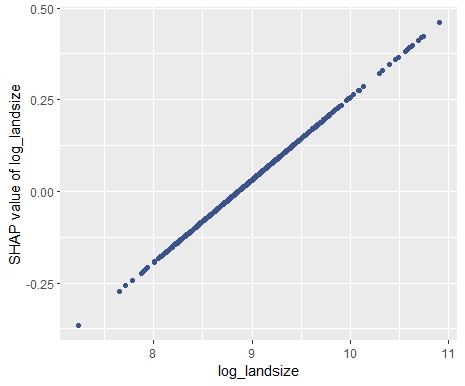
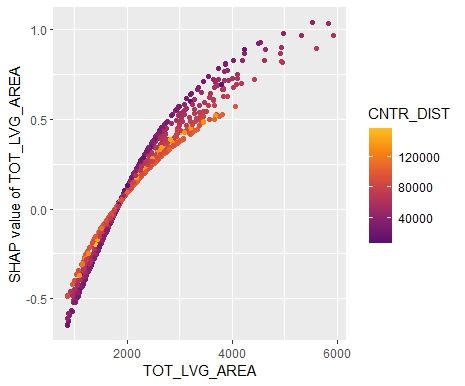
SHAP Importance: Living area and the distance to the central district are the two most important predictors. The month (within 2016) impacts the predicted prices by +-1.3% on average.SHAP dependence plot of “log_landsize”. The effect is linear. The slope 0.22559 agrees with the model coefficient.Dependence plot for “structure_quality”: The difference between structure quality 4 and 5 is 0.2184365. This equals the difference in regression coefficients.Dependence plot of “living_area”: The effect is very steep. The more central, the steeper. We cannot easily compare these numbers with the output of the linear regression.
Summary
Interpreting complex linear models with SHAP is an option. There seems to be a correspondence between regression coefficients and SHAP dependence, at least for additive components.
Kernel SHAP in R is fast. For models with slower predict() functions (e.g. GAMs, random forests, or neural nets), we often need to wait a couple of minutes.
This is the next article in our series “Lost in Translation between R and Python”. The aim of this series is to provide high-quality R and Python code to achieve some non-trivial tasks. If you are to learn R, check out the R tab below. Similarly, if you are to learn Python, the Python tab will be your friend.
Kernel SHAP
SHAP is one of the most used model interpretation technique in Machine Learning. It decomposes predictions into additive contributions of the features in a fair way. For tree-based methods, the fast TreeSHAP algorithm exists. For general models, one has to resort to computationally expensive Monte-Carlo sampling or the faster Kernel SHAP algorithm. Kernel SHAP uses a regression trick to get the SHAP values of an observation with a comparably small number of calls to the predict function of the model. Still, it is much slower than TreeSHAP.
Two good references for Kernel SHAP:
Scott M. Lundberg and Su-In Lee. A Unified Approach to Interpreting Model Predictions. Advances in Neural Information Processing Systems 30, 2017.
Ian Covert and Su-In Lee. Improving KernelSHAP: Practical Shapley Value Estimation Using Linear Regression. Proceedings of The 24th International Conference on Artificial Intelligence and Statistics, PMLR 130:3457-3465, 2021.
In our last post, we introduced our new “kernelshap” package in R. Since then, the package has been substantially improved, also by the big help of David Watson:
The package now supports multi-dimensional predictions.
It received a massive speed-up
Additionally, parallel computing can be activated for even faster calculations.
The interface has become more intuitive.
If the number of features is small (up to ten or eleven), it can provide exact Kernel SHAP values just like the reference Python implementation.
For a larger number of features, it now uses partly-exact (“hybrid”) calculations, very similar to the logic in the Python implementation.
With those changes, the R implementation is about to meet the Python version at eye level.
Example with four features
In the following, we use the diamonds data to fit a linear regression with
log(price) as response
log(carat) as numeric feature
clarity, color and cut as categorical features (internally dummy encoded)
interactions between log(carat) and the other three “C” variables. Note that the interactions are very weak
Then, we calculate SHAP decompositions for about 1000 diamonds (every 53th diamond), using 120 diamonds as background dataset. In this case, both R and Python will use exact calculations based on m=2^4 – 2 = 14 possible binary on-off vectors (a value of 1 representing a feature value picked from the original observation, a value of 0 a value picked from the background data).
R
Python
library(ggplot2)
library(kernelshap)

# Turn ordinal factors into unordered
ord <- c("clarity", "color", "cut")
diamonds[, ord] <- lapply(diamonds[ord], factor, ordered = FALSE)

# Fit model
fit <- lm(log(price) ~ log(carat) * (clarity + color + cut), data = diamonds)

# Subset of 120 diamonds used as background data
bg_X <- diamonds[seq(1, nrow(diamonds), 450), ]

# Subset of 1018 diamonds to explain
X_small <- diamonds[seq(1, nrow(diamonds), 53), c("carat", ord)]

# Exact KernelSHAP (5 seconds)
system.time(
  ks <- kernelshap(fit, X_small, bg_X = bg_X)
)
ks

# SHAP values of first 2 observations:
#          carat     clarity     color        cut
# [1,] -2.050074 -0.28048747 0.1281222 0.01587382
# [2,] -2.085838  0.04050415 0.1283010 0.03731644

# Using parallel backend
library("doFuture")

registerDoFuture()
plan(multisession, workers = 2)  # Windows
# plan(multicore, workers = 2)   # Linux, macOS, Solaris

# 3 seconds on second call
system.time(
  ks3 <- kernelshap(fit, X_small, bg_X = bg_X, parallel = TRUE)
)

# Visualization
library(shapviz)

sv <- shapviz(ks)
sv_importance(sv, "bee")
import numpy as np
import pandas as pd
from plotnine.data import diamonds
from statsmodels.formula.api import ols
from shap import KernelExplainer

# Turn categoricals into integers because, inconveniently, kernel SHAP
# requires numpy array as input
ord = ["clarity", "color", "cut"]
x = ["carat"] + ord
diamonds[ord] = diamonds[ord].apply(lambda x: x.cat.codes)
X = diamonds[x].to_numpy()

# Fit model with interactions and dummy variables
fit = ols(
  "np.log(price) ~ np.log(carat) * (C(clarity) + C(cut) + C(color))",
  data=diamonds
).fit()

# Background data (120 rows)
bg_X = X[0:len(X):450]

# Define subset of 1018 diamonds to explain
X_small = X[0:len(X):53]

# Calculate KernelSHAP values
ks = KernelExplainer(
  model=lambda X: fit.predict(pd.DataFrame(X, columns=x)),
  data = bg_X
)
sv = ks.shap_values(X_small)  # 74 seconds
sv[0:2]

# array([[-2.05007406, -0.28048747,  0.12812216,  0.01587382],
#        [-2.0858379 ,  0.04050415,  0.12830103,  0.03731644]])
SHAP summary plot (R model)
The results match, hurray!
Example with nine features
The computation effort of running exact Kernel SHAP explodes with the number of features. For nine features, the number of relevant on-off vectors is 2^9 – 2 = 510, i.e. about 36 times larger than with four features.
We now modify above example, adding five additional features to the model. Note that the model structure is completely non-sensical. We just use it to get a feeling about what impact a 36 times larger workload has.
Besides exact calculations, we use an almost exact hybrid approach for both R and Python, using 126 on-off vectors (p*(p+1) for the exact part and 4p for the sampling part, where p is the number of features), resulting in a significant speed-up both in R and Python.
R
Python
fit <- lm(
  log(price) ~ log(carat) * (clarity + color + cut) + x + y + z + table + depth,
  data = diamonds
)

# Subset of 1018 diamonds to explain
X_small <- diamonds[seq(1, nrow(diamonds), 53), setdiff(names(diamonds), "price")]

# Exact Kernel SHAP: 61 seconds
system.time(
  ks <- kernelshap(fit, X_small, bg_X = bg_X, exact = TRUE)
)
ks
#          carat        cut     color     clarity         depth         table          x           y            z
# [1,] -1.842799 0.01424231 0.1266108 -0.27033874 -0.0007084443  0.0017787647 -0.1720782 0.001330275 -0.006445693
# [2,] -1.876709 0.03856957 0.1266546  0.03932912 -0.0004202636 -0.0004871776 -0.1739880 0.001397792 -0.006560624

# Default, using an almost exact hybrid algorithm: 17 seconds
system.time(
  ks <- kernelshap(fit, X_small, bg_X = bg_X, parallel = TRUE)
)
#          carat        cut     color     clarity         depth         table          x           y            z
# [1,] -1.842799 0.01424231 0.1266108 -0.27033874 -0.0007084443  0.0017787647 -0.1720782 0.001330275 -0.006445693
# [2,] -1.876709 0.03856957 0.1266546  0.03932912 -0.0004202636 -0.0004871776 -0.1739880 0.001397792 -0.006560624
x = ["carat"] + ord + ["table", "depth", "x", "y", "z"]
X = diamonds[x].to_numpy()

# Fit model with interactions and dummy variables
fit = ols(
  "np.log(price) ~ np.log(carat) * (C(clarity) + C(cut) + C(color)) + table + depth + x + y + z",
  data=diamonds
).fit()

# Background data (120 rows)
bg_X = X[0:len(X):450]

# Define subset of 1018 diamonds to explain
X_small = X[0:len(X):53]

# Calculate KernelSHAP values: 12 minutes
ks = KernelExplainer(
  model=lambda X: fit.predict(pd.DataFrame(X, columns=x)),
  data = bg_X
)
sv = ks.shap_values(X_small)
sv[0:2]
# array([[-1.84279897e+00, -2.70338744e-01,  1.26610769e-01,
#          1.42423108e-02,  1.77876470e-03, -7.08444295e-04,
#         -1.72078182e-01,  1.33027467e-03, -6.44569296e-03],
#        [-1.87670887e+00,  3.93291219e-02,  1.26654599e-01,
#          3.85695742e-02, -4.87177593e-04, -4.20263565e-04,
#         -1.73988040e-01,  1.39779179e-03, -6.56062359e-03]])

# Now, using a hybrid between exact and sampling: 5 minutes
sv = ks.shap_values(X_small, nsamples=126)
sv[0:2]
# array([[-1.84279897e+00, -2.70338744e-01,  1.26610769e-01,
#          1.42423108e-02,  1.77876470e-03, -7.08444295e-04,
#         -1.72078182e-01,  1.33027467e-03, -6.44569296e-03],
#        [-1.87670887e+00,  3.93291219e-02,  1.26654599e-01,
#          3.85695742e-02, -4.87177593e-04, -4.20263565e-04,
#         -1.73988040e-01,  1.39779179e-03, -6.56062359e-03]])
Again, the results are essentially the same between R and Python, but also between the hybrid algorithm and the exact algorithm. This is interesting, because the hybrid algorithm is significantly faster than the exact one.
Wrap-Up
R is catching up with Python’s superb “shap” package.
For two non-trivial linear regressions with interactions, the “kernelshap” package in R provides the same output as Python.
The hybrid between exact and sampling KernelSHAP (as implemented in Python and R) offers a very good trade-off between speed and accuracy.
Our last posts were on SHAP, one of the major ways to shed light into black-box Machine Learning models. SHAP values decompose predictions in a fair way into additive contributions from each feature. Decomposing many predictions and then analyzing the SHAP values gives a relatively quick and informative picture of the fitted model at hand.
In their 2017 paper on SHAP, Scott Lundberg and Su-In Lee presented Kernel SHAP, an algorithm to calculate SHAP values for any model with numeric predictions. Compared to Monte-Carlo sampling (e.g. implemented in R package “fastshap”), Kernel SHAP is much more efficient.
I had one problem with Kernel SHAP: I never really understood how it works!
Then I found this article by Covert and Lee (2021). The article not only explains all the details of Kernel SHAP, it also offers an version that would iterate until convergence. As a by-product, standard errors of the SHAP values can be calculated on the fly.
This article motivated me to implement the “kernelshap” package in R, complementing “shapr” that uses a different logic.
The new “kernelshap” package in R
Bleeding edge version 0.1.1 on Github: https://github.com/mayer79/kernelshap
The interface is quite simple: You need to pass three things to its main function kernelshap():
X: matrix/data.frame/tibble/data.table of observations to explain. Each column is a feature.
pred_fun: function that takes an object like X and provides one number per row.
bg_X: matrix/data.frame/tibble/data.table representing the background dataset used to calculate marginal expectation. Typically, between 100 and 200 rows.
Example
We will use Keras to build a deep learning model with 631 parameters on diamonds data. Then we decompose 500 predictions with kernelshap() and visualize them with “shapviz”.
We will fit a Gamma regression with log link the four “C” features:
carat
color
clarity
cut
R
library(tidyverse)
library(keras)

# Response and covariates
y <- as.numeric(diamonds$price)
X <- scale(data.matrix(diamonds[c("carat", "color", "cut", "clarity")]))

# Input layer: we have 4 covariates
input <- layer_input(shape = 4)

# Two hidden layers with contracting number of nodes
output <- input %>%
  layer_dense(units = 30, activation = "tanh") %>%
  layer_dense(units = 15, activation = "tanh") %>%
  layer_dense(units = 1, activation = k_exp)

# Create and compile model
nn <- keras_model(inputs = input, outputs = output)
summary(nn)

# Gamma regression loss
loss_gamma <- function(y_true, y_pred) {
  -k_log(y_true / y_pred) + y_true / y_pred
}

nn %>%
  compile(
    optimizer = optimizer_adam(learning_rate = 0.001),
    loss = loss_gamma
  )

# Callbacks
cb <- list(
  callback_early_stopping(patience = 20),
  callback_reduce_lr_on_plateau(patience = 5)
)

# Fit model
history <- nn %>%
  fit(
    x = X,
    y = y,
    epochs = 100,
    batch_size = 400,
    validation_split = 0.2,
    callbacks = cb
  )

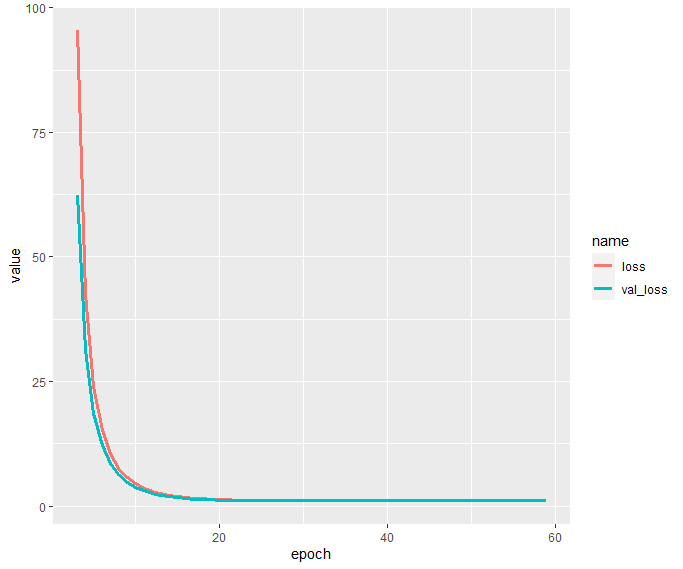
history$metrics[c("loss", "val_loss")] %>%
  data.frame() %>%
  mutate(epoch = row_number()) %>%
  filter(epoch >= 3) %>%
  pivot_longer(cols = c("loss", "val_loss")) %>%
ggplot(aes(x = epoch, y = value, group = name, color = name)) +
  geom_line(size = 1.4)
Interpretation via KernelSHAP
In order to peak into the fitted model, we apply the Kernel SHAP algorithm to decompose 500 randomly selected diamond predictions. We use the same subset as background dataset required by the Kernel SHAP algorithm.
Afterwards, we will study
Some SHAP values and their standard errors
One waterfall plot
A beeswarm summary plot to get a rough picture of variable importance and the direction of the feature effects
A SHAP dependence plot for carat
R
# Interpretation on 500 randomly selected diamonds
library(kernelshap)
library(shapviz)

sample(1)
ind <- sample(nrow(X), 500)

dia_small <- X[ind, ]

# 77 seconds
system.time(
  ks <- kernelshap(
    dia_small,
    pred_fun = function(X) as.numeric(predict(nn, X, batch_size = nrow(X))),
    bg_X = dia_small
  )
)
ks

# Output
# 'kernelshap' object representing
# - SHAP matrix of dimension 500 x 4
# - feature data.frame/matrix of dimension 500 x 4
# - baseline value of 3744.153
#
# SHAP values of first 2 observations:
#         carat     color       cut   clarity
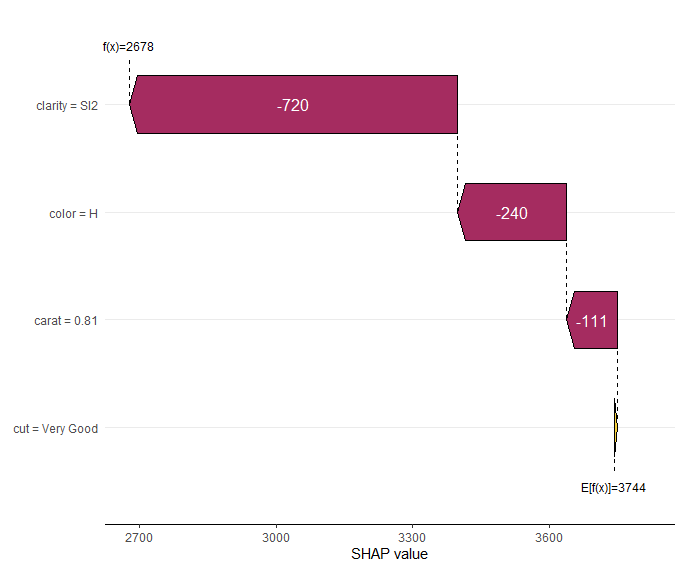
# [1,] -110.738 -240.2758  5.254733 -720.3610
# [2,] 2379.065  263.3112 56.413680  452.3044
#
# Corresponding standard errors:
#         carat      color       cut  clarity
# [1,] 2.064393 0.05113337 0.1374942 2.150754
# [2,] 2.614281 0.84934844 0.9373701 0.827563

sv <- shapviz(ks, X = diamonds[ind, x])
sv_waterfall(sv, 1)
sv_importance(sv, "both")
sv_dependence(sv, "carat", "auto")
Note the small standard errors of the SHAP values of the first two diamonds. They are only approximate because the background data is only a sample from an unknown population. Still, they give a good impression on the stability of the results.
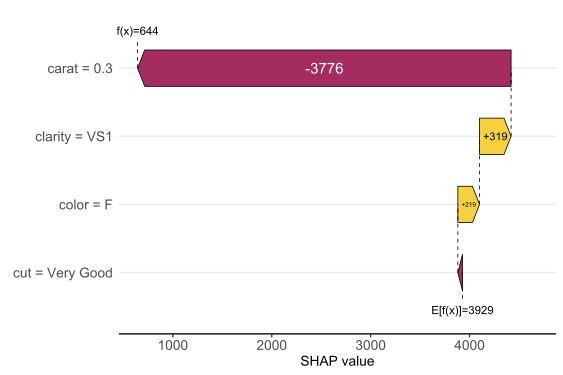
The waterfall plot shows a diamond with not super nice clarity and color, pulling down the value of this diamond. Note that, even if the model is working with scaled numeric feature values, the plot shows the original feature values.
SHAP waterfall plot of one diamond. Note its bad clarity.
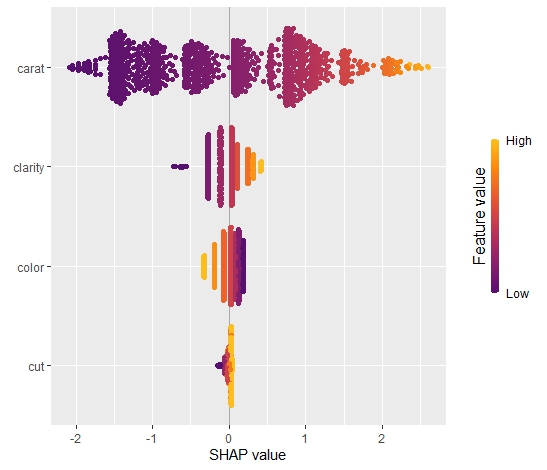
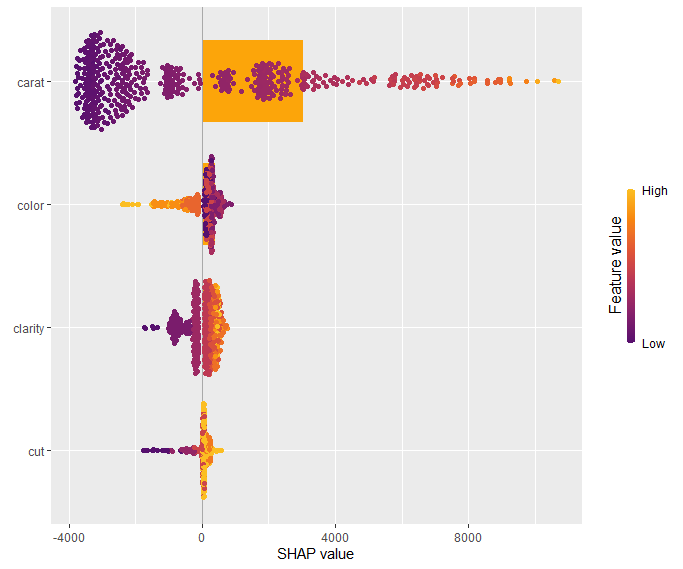
The SHAP summary plot shows that “carat” is, unsurprisingly, the most important variable and that high carat mean high value. “cut” is not very important, except if it is extremely bad.
SHAP summary plot with bars representing average absolute values as measure of importance.
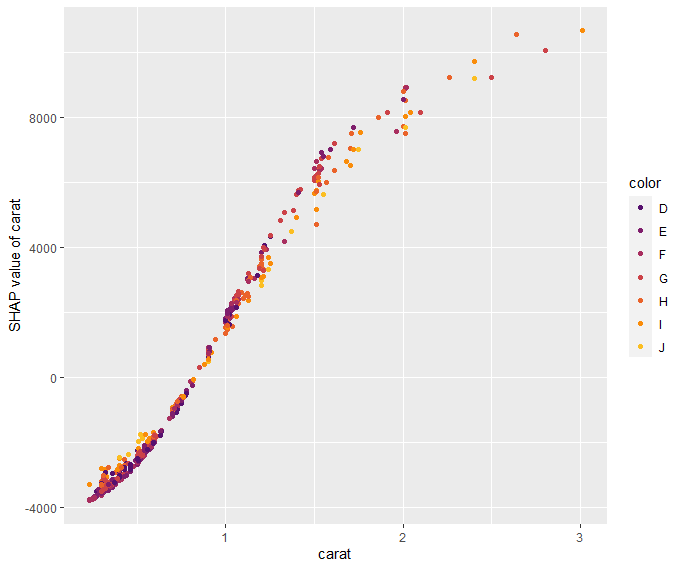
Our last plot is a SHAP dependence plot for “carat”: the effect makes sense, and we can spot some interaction with color. For worse colors (H-J), the effect of carat is a bit less strong as for the very white diamonds.
Dependence plot for “carat”
Short wrap-up
Standard Kernel SHAP in R, yeahhhhh 🙂
The Github version is relatively fast, so you can even decompose 500 observations of a deep learning model within 1-2 minutes.
In a recent post, I introduced the initial version of the “shapviz” package. Its motto: do one thing, but do it well: visualize SHAP values.
The initial community feedback was very positive, and a couple of things have been improved in version 0.2.0. Here the main changes:
“shapviz” now works with tree-based models of the h2o package in R.
Additionally, it wraps the shapr package, which implements an improved version of Kernel SHAP taking into account feature dependence.
A simple interface to collapse SHAP values of dummy variables was added.
The default importance plot is now a bar plot, instead of the (slower) beeswarm plot. In later releases, the latter might be moved to a separate function sv_summary() for consistency with other packages.
Importance plot and dependence plot now work neatly with ggplotly(). The other plot types cannot be translated with ggplotly() because they use geoms from outside ggplot. At least I do not know how to do this…
Example
Let’s build an H2O gradient boosted trees model to explain diamond prices. Then, we explain the model with our “shapviz” package. Note that H2O itself also offers some SHAP plots. “shapviz” is directly applied to the fitted H2O model. This means you don’t have to write a single superfluous line of code.
R
library(shapviz)
library(tidyverse)
library(h2o)

h2o.init()

set.seed(1)

# Get rid of that darn ordinals
ord <- c("clarity", "cut", "color")
diamonds[, ord] <- lapply(diamonds[, ord], factor, ordered = FALSE)

# Minimally tuned GBM with 260 trees, determined by early-stopping with CV
dia_h2o <- as.h2o(diamonds)
fit <- h2o.gbm(
  c("carat", "clarity", "color", "cut"),
  y = "price",
  training_frame = dia_h2o,
  nfolds = 5,
  learn_rate = 0.05,
  max_depth = 4,
  ntrees = 10000,
  stopping_rounds = 10,
  score_each_iteration = TRUE
)
fit

# SHAP analysis on about 2000 diamonds
X_small <- diamonds %>%
  filter(carat <= 2.5) %>%
  sample_n(2000) %>%
  as.h2o()

shp <- shapviz(fit, X_pred = X_small)

sv_importance(shp, show_numbers = TRUE)
sv_importance(shp, show_numbers = TRUE, kind = "bee")
sv_dependence(shp, "color", "auto", alpha = 0.5)
sv_force(shp, row_id = 1)
sv_waterfall(shp, row_id = 1)
Summary and importance plots
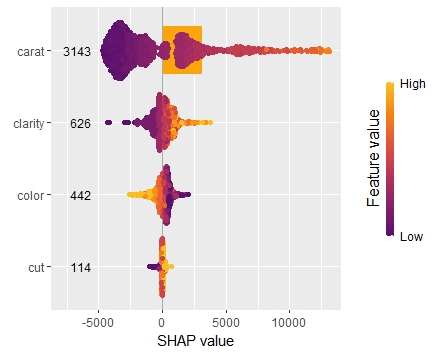
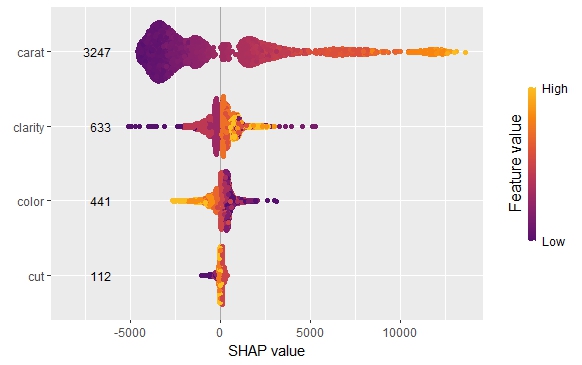
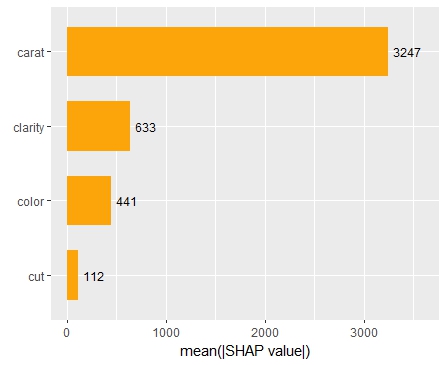
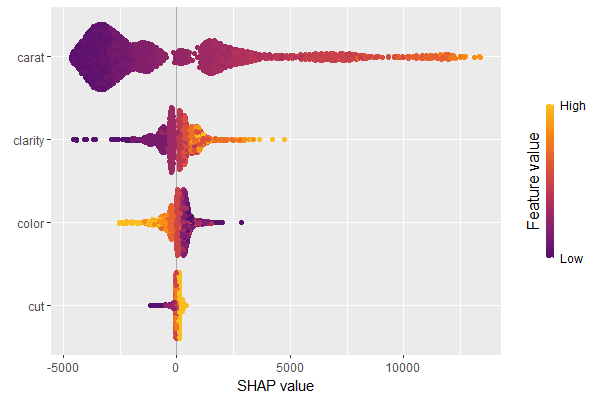
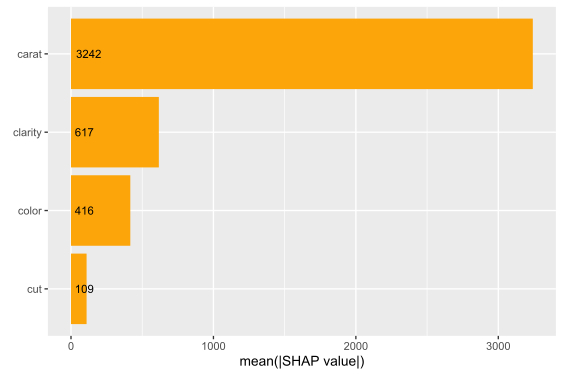
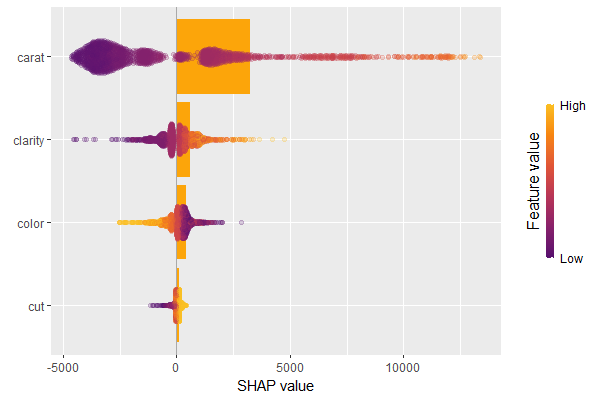
The SHAP importance and SHAP summary plots clearly show that carat is the most important variable. On average, it impacts the prediction by 3247 USD. The effect of “cut” is much smaller. Its impact on the predictions, on average, is plus or minus 112 USD.
SHAP summary plotSHAP importance plot
SHAP dependence plot
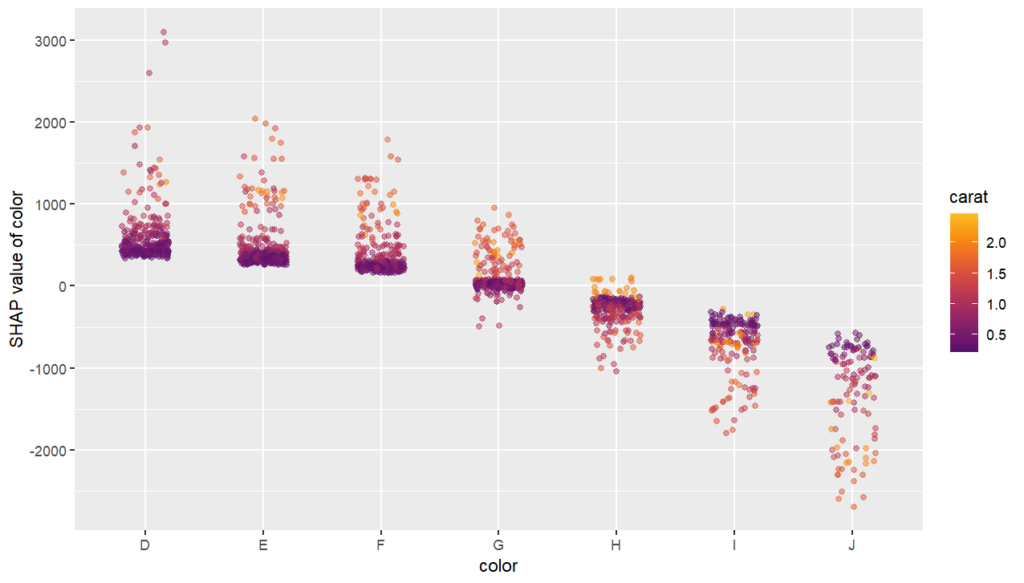
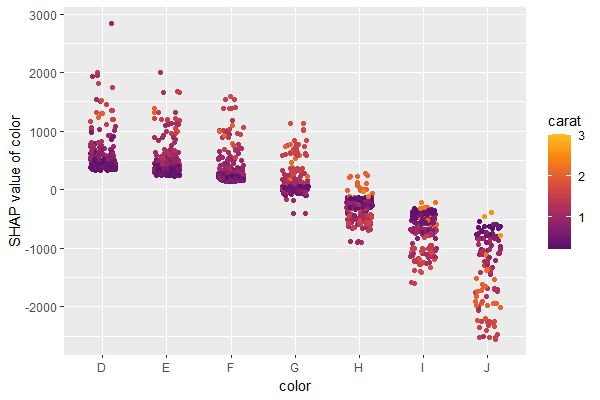
The SHAP dependence plot shows the effect of “color” on the prediction: The better the color (close to “D”), the higher the price. Using a correlation based heuristic, the plot selected carat on the color scale to show that the color effect is hightly influenced by carat in the sense that the impact of color increases with larger diamond weight. This clearly makes sense!
Dependence plot for “color”
Waterfall and force plot
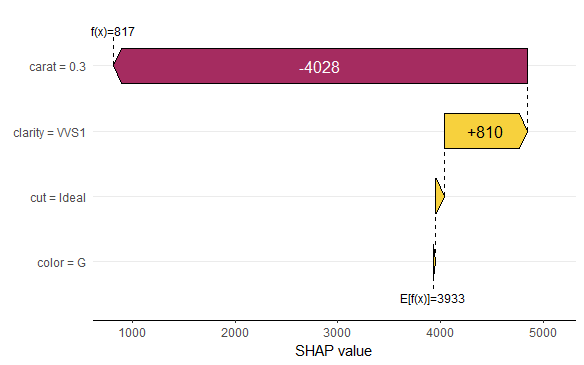
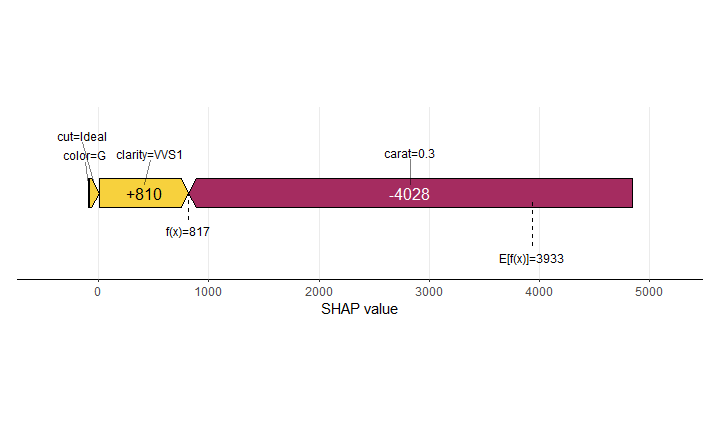
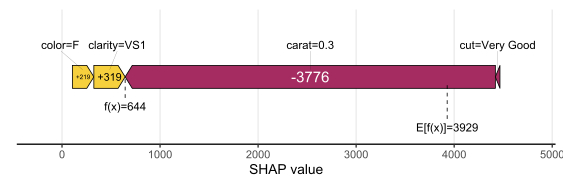
Finally, the waterfall and force plots show how a single prediction is decomposed into contributions from each feature. While this does not tell much about the model itself, it might be helpful to explain what SHAP values are and to debug strange predictions.
Waterfall plotForce plot
Short wrap-up
Combining “shapviz” and H2O is fun. Okay, that one was subjective :-).
Good visualization of ML models is extremely helpful and reassuring.
SHAP (SHapley Additive exPlanations, Lundberg and Lee, 2017) is an ingenious way to study black box models. SHAP values decompose – as fair as possible – predictions into additive feature contributions.
When it comes to SHAP, the Python implementation is the de-facto standard. It not only offers many SHAP algorithms, but also provides beautiful plots. In R, the situation is a bit more confusing. Different packages contain implementations of SHAP algorithms, e.g.,
some of which with great visualizations. Plus there is SHAPforxgboost (see my recent post), originally designed to visualize the results of SHAP values calculated from XGBoost, but it can also be used more generally by now.
The shapviz package
In order to entangle calculation from visualization, the shapviz package was designed. It solely focuses on visualization of SHAP values. Closely following its README, it currently provides these plots:
sv_waterfall(): Waterfall plots to study single predictions.
sv_force(): Force plots as an alternative to waterfall plots.
sv_importance(): Importance plots (bar and/or beeswarm plots) to study variable importance.
sv_dependence(): Dependence plots to study feature effects (optionally colored by heuristically strongest interacting feature).
They require a “shapviz” object, which is built from two things only:
S: Matrix of SHAP values
X: Dataset with corresponding feature values
Furthermore, a “baseline” can be passed to represent an average prediction on the scale of the SHAP values.
A key feature of the “shapviz” package is that X is used for visualization only. Thus it is perfectly fine to use factor variables, even if the underlying model would not accept these.
To further simplify the use of shapviz, direct connectors to the packages
One line of code creates a shapviz object. It contains SHAP values and feature values for the set of observations we are interested in. Note again that X is solely used as explanation dataset, not for calculating SHAP values.
In this example we construct the shapviz object directly from the fitted XGBoost model. Thus we also need to pass a corresponding prediction dataset X_pred used for calculating SHAP values by XGBoost.
R
shp <- shapviz(fit, X_pred = data.matrix(X_small), X = X_small)
Explaining one single prediction
Let’s start by explaining a single prediction by a waterfall plot or, alternatively, a force plot.
R
# Two types of visualizations
sv_waterfall(shp, row_id = 1)
sv_force(shp, row_id = 1
Waterfall plot
Factor/character variables are kept as they are, even if the underlying XGBoost model required them to be integer encoded.
Force plot
Explaining the model as a whole
We have decomposed 2000 predictions, not just one. This allows us to study variable importance at a global model level by studying average absolute SHAP values as a bar plot or by looking at beeswarm plots of SHAP values.
Beeswarm plotBar plotBeeswarm plot overlaid with bar plot
A scatterplot of SHAP values of a feature like color against its observed values gives a great impression on the feature effect on the response. Vertical scatter gives additional info on interaction effects. shapviz offers a heuristic to pick another feature on the color scale with potential strongest interaction.
R
sv_dependence(shp, v = "color", "auto")
Dependence plot with automatic interaction colorization
Summary
The “shapviz” has a single purpose: making SHAP plots.
Its interface is optimized for existing SHAP crunching packages and can easily be used in future packages as well.
All plots are highly customizable. Furthermore, they are all written with ggplot and allow corresponding modifications.
There are different R packages devoted to model agnostic interpretability, DALEX and iml being among the best known. In 2019, I added flashlight
for a couple of reasons:
Its explainers work with case weights.
Multiple explainers can be combined to a multi-explainer.
Stratified calculation is possible.
Since almost all plots in flashlight are constructed with ggplot, it is super easy to turn them into interactive plotly objects: just add a simple ggplotly() to the end of the call.
We will use a sweet dataset with more than 20’000 houses to model house prices by a set of derived features such as the logarithmic living area. The location will be represented by the postal code.
Data preparation
We first load the data and prepare some of the columns for modeling. Furthermore, we specify the set of features and the response.
Now, we are ready to inspect our two models regarding performance, variable importance, and effects.
Set up explainers
First, we pack all model dependent information into flashlights (the explainer objects) and combine them to a multiflashlight. As evaluation dataset, we pass the test data. This ensures that interpretability tools using the response (e.g., performance measures and permutation importance) are not being biased by overfitting.
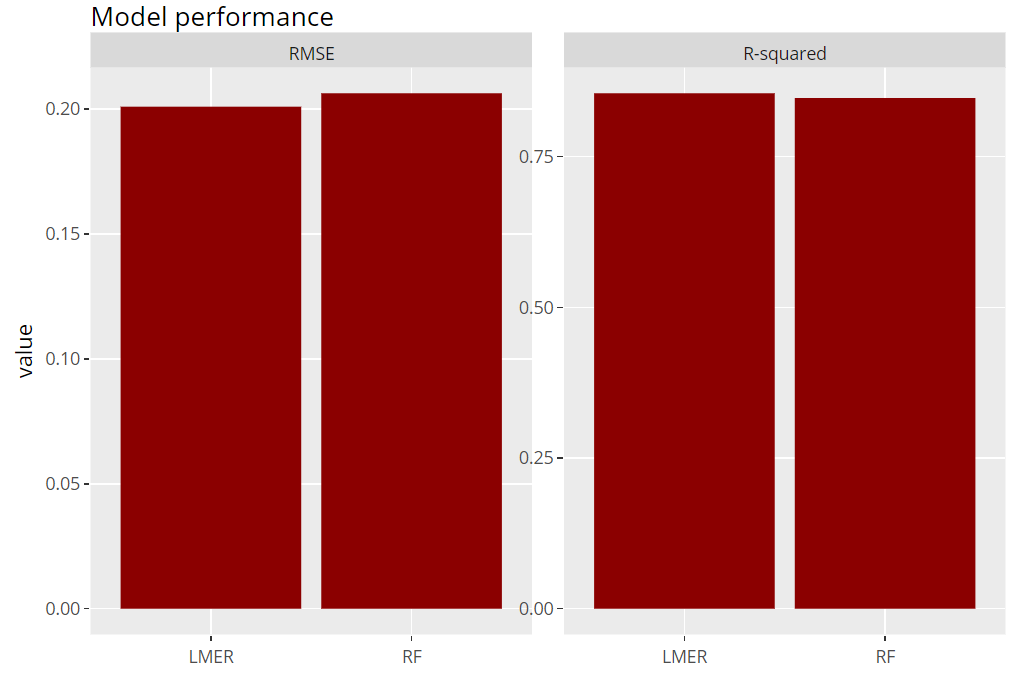
Let’s evaluate model RMSE and R-squared on the hold-out dataset. Here, the mixed-effects model performs a tiny little bit better than the random forest:
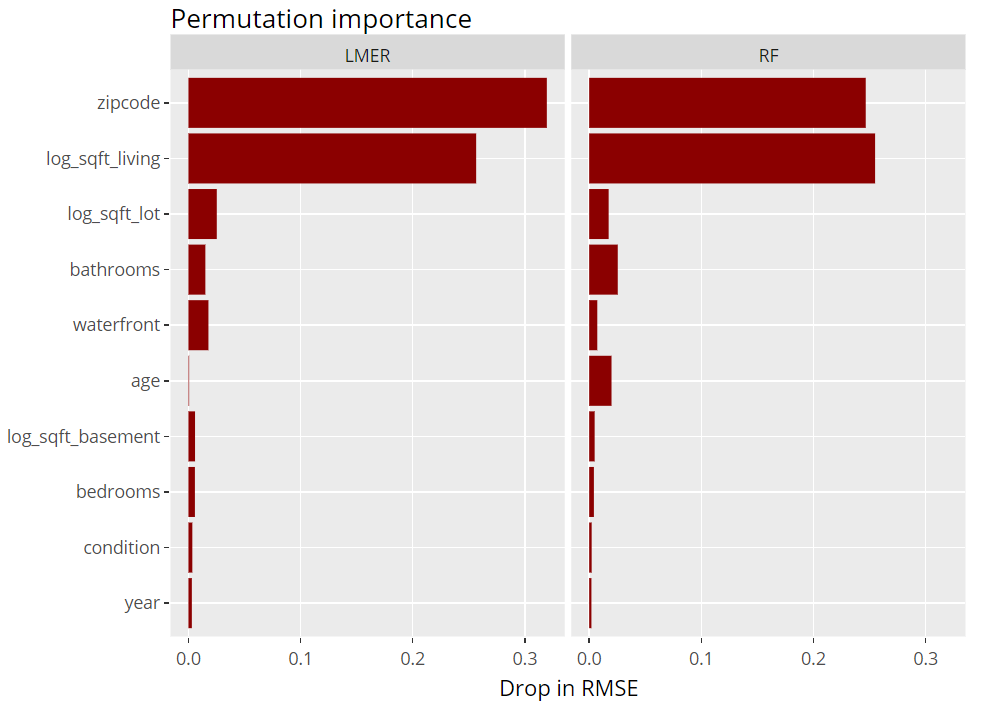
Next, we inspect the variable strength based on permutation importance. It shows by how much the RMSE is being increased when shuffling a variable before prediction. The results are quite similar between the two models.
R
(light_importance(fls, v = x) %>%
    plot(fill = "darkred") +
    labs(title = "Permutation importance", y = "Drop in RMSE")) %>%
  ggplotly()
Variable importance (png)
ICE plot
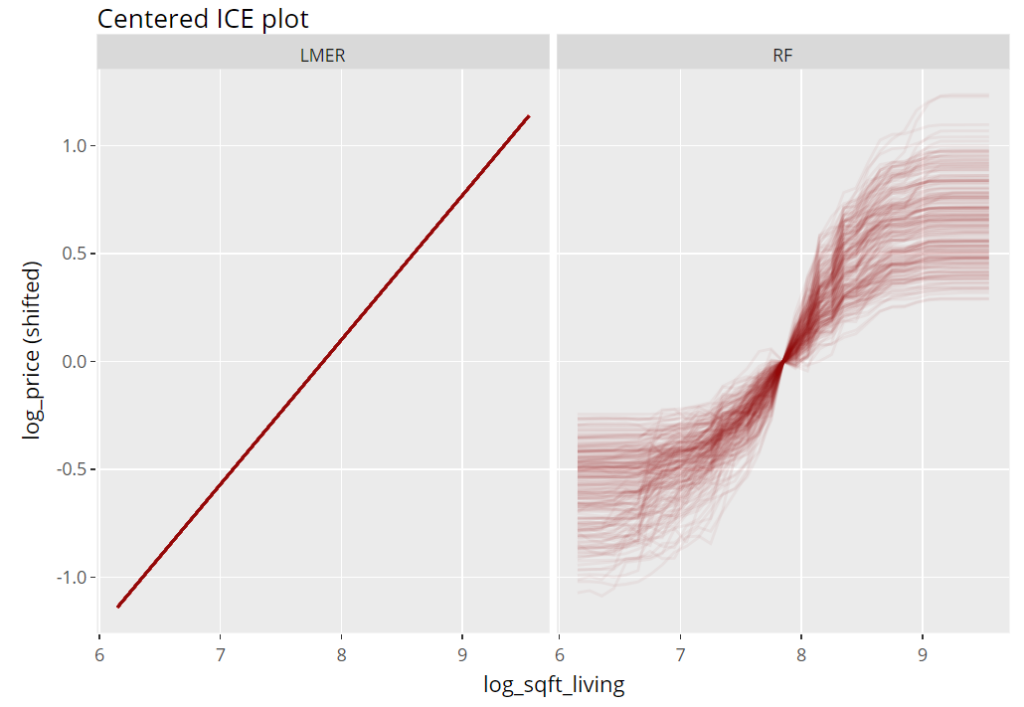
To get an impression of the effect of the living area, we select 200 observations and profile their predictions with increasing (log) living area, keeping everything else fixed (Ceteris Paribus). These ICE (individual conditional expectation) plots are vertically centered in order to highlight potential interaction effects. If all curves coincide, there are no interaction effects and we can say that the effect of the feature is modelled in an additive way (no surprise for the additive linear mixed-effects model).
R
(light_ice(fls, v = "log_sqft_living", n_max = 200, center = "middle") %>%
    plot(alpha = 0.05, color = "darkred") +
    labs(title = "Centered ICE plot", y = "log_price (shifted)")) %>%
  ggplotly()
Partial dependence plots
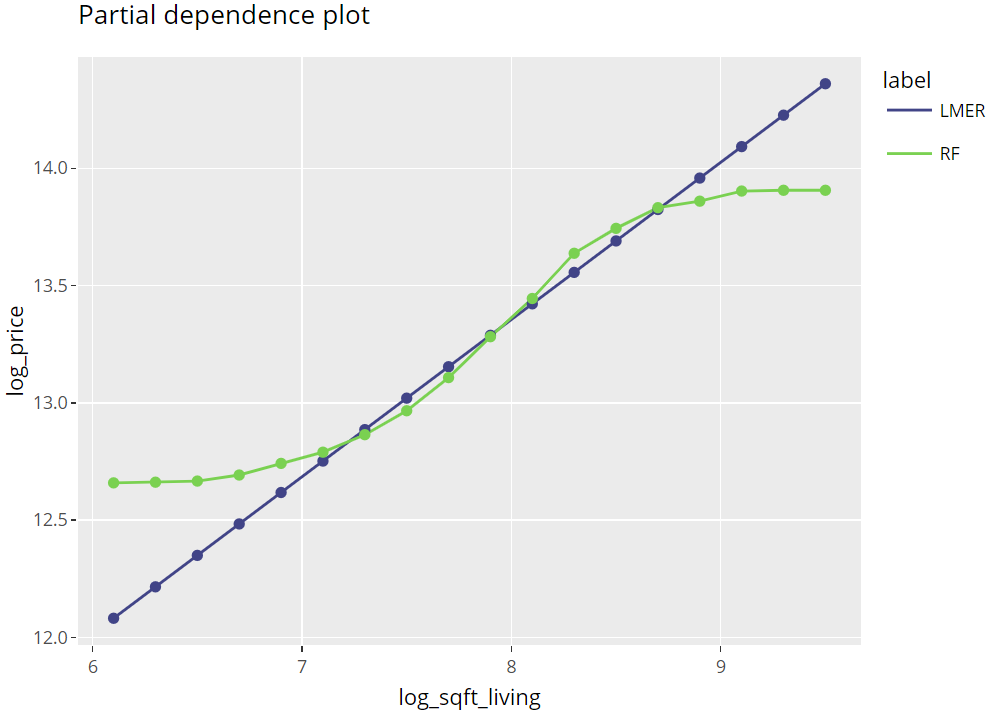
Averaging many uncentered ICE curves provides the famous partial dependence plot, introduced in Friedman’s seminal paper on gradient boosting machines (2001).
R
(light_profile(fls, v = "log_sqft_living", n_bins = 21) %>%
    plot(rotate_x = FALSE) +
    labs(title = "Partial dependence plot", y = y) +
    scale_colour_viridis_d(begin = 0.2, end = 0.8)) %>%
  ggplotly()
Partial dependence plots (png)
Multiple effects visualized together
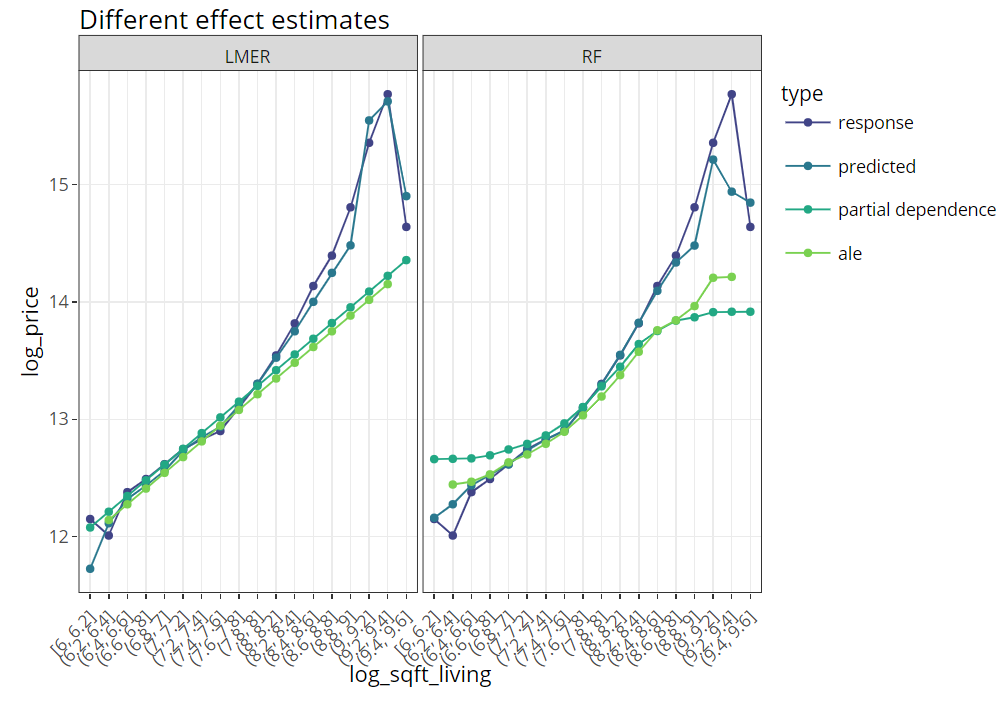
The last figure extends the partial dependence plot with three additional curves, all evaluated on the hold-out dataset:
Average observed values
Average predictions
ALE plot (“accumulated local effects”, an alternative to partial dependence plots with relaxed Ceteris Paribus assumption)
R
(light_effects(fls, v = "log_sqft_living", n_bins = 21) %>%
    plot(use = "all")  +
    labs(title = "Different effect estimates", y = y) +
    scale_colour_viridis_d(begin = 0.2, end = 0.8)) %>%
  ggplotly()
This is the next article in our series “Lost in Translation between R and Python”. The aim of this series is to provide high-quality R and Python 3 code to achieve some non-trivial tasks. If you are to learn R, check out the R tab below. Similarly, if you are to learn Python, the Python tab will be your friend.
DuckDB
DuckDB is a fantastic in-process SQL database management system written completely in C++. Check its official documentation and other blogposts like this to get a feeling of its superpowers. It is getting better and better!
Some of the highlights:
Easy installation in R and Python, made possible via language bindings.
Multiprocessing and fast.
Allows to work with data bigger than RAM.
Can fire SQL queries on R and Pandas tables.
Can fire SQL queries on (multiple!) csv and/or Parquet files.
Additional packages required to run the code of this post are indicated in the code.
A first query
Let’s start by loading a dataset, initializing DuckDB and running a simple query.
The dataset we use here contains information on over 20,000 sold houses in Kings County. Along with the sale price, different features describe the size and location of the properties. The dataset is available on OpenML.org with ID 42092.
R
Python
library(OpenML)
library(duckdb)
library(tidyverse)

# Load data
df <- getOMLDataSet(data.id = 42092)$data

# Initialize duckdb, register df and materialize first query
con = dbConnect(duckdb())
duckdb_register(con, name = "df", df = df)
con %>%
  dbSendQuery("SELECT * FROM df limit 5") %>%
  dbFetch()
import duckdb
import pandas as pd
from sklearn.datasets import fetch_openml

# Load data
df = fetch_openml(data_id=42092, as_frame=True)["frame"]

# Initialize duckdb, register df and fire first query
# If out-of-RAM: duckdb.connect("py.duckdb", config={"temp_directory": "a_directory"})
con = duckdb.connect()
con.register("df", df)
con.execute("SELECT * FROM df limit 5").fetchdf()
Result of first query (from R)
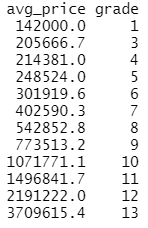
Average price per grade
If you like SQL, then you can do your data preprocessing and simple analyses with DuckDB. Here, we calculate the average house price per online grade (the higher the grade, the better the house).
R
Python
query <-
  "
  SELECT AVG(price) avg_price, grade
  FROM df
  GROUP BY grade
  ORDER BY grade
  "
avg <- con %>%
  dbSendQuery(query) %>%
  dbFetch()

avg
# Average price per grade
query = """
  SELECT AVG(price) avg_price, grade
  FROM df
  GROUP BY grade
  ORDER BY grade
  """
avg = con.execute(query).fetchdf()
avg
R output
Highlight: queries to files
The last query will be applied directly to files on disk. To demonstrate this fantastic feature, we first save “df” as a parquet file and “avg” as a csv file.
# Save df and avg to different file types
df.to_parquet("housing.parquet")  # pyarrow=7
avg.to_csv("housing_avg.csv", index=False)
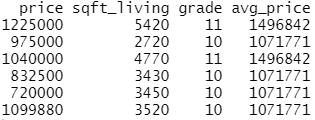
Let’s load some columns of “housing.parquet” data, but only rows with grades having an average price of one million USD. Agreed, that query does not make too much sense but I hope you get the idea…😃
R
Python
# "Complex" query
query2 <- "
  SELECT price, sqft_living, A.grade, avg_price
  FROM 'housing.parquet' A
  LEFT JOIN 'housing_avg.csv' B
  ON A.grade = B.grade
  WHERE B.avg_price > 1000000
  "

expensive_grades <- con %>%
  dbSendQuery(query2) %>%
  dbFetch()

head(expensive_grades)

# dbDisconnect(con)
# Complex query
query2 = """
  SELECT price, sqft_living, A.grade, avg_price
  FROM 'housing.parquet' A
  LEFT JOIN 'housing_avg.csv' B
  ON A.grade = B.grade
  WHERE B.avg_price > 1000000
  """
expensive_grades = con.execute(query2).fetchdf()
expensive_grades

# con.close()
R output
Last words
DuckDB is cool!
If you have strong SQL skills but do not know R or Python so well, this is a great way to get used to those programming languages.
If you are unfamiliar to SQL but like R and/or Python, you can use DuckDB for a while and end up being an SQL addict.
If your analysis involves combining many large files during preprocessing, then you can try the trick shown in the last example of this post.
It must have been around the year 2000, when I wrote my first snipped of SPLUS/R code. One thing I’ve learned back then:
Loops are slow. Replace them with
vectorized calculations or
if vectorization is not possible, use sapply() et al.
Since then, the R core team and the community has invested tons of time to improve R and also to make it faster. There are things like RCPP and parallel computing to speed up loops.
But what still relatively few R users know: loops are not that slow anymore. We want to demonstrate this using two examples.
Example 1: sqrt()
We use three ways to calculate the square root of a vector of random numbers:
Vectorized calculation. This will be the way to go because it is internally optimized in C.
A loop. This must be super slow for large vectors.
vapply() (as safe alternative to sapply).
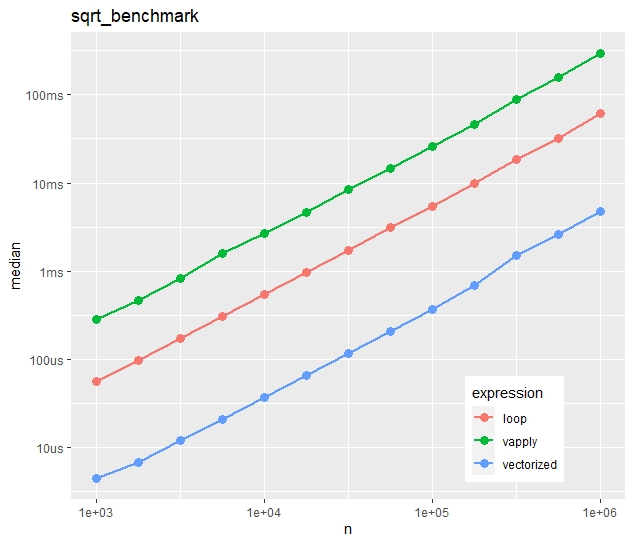
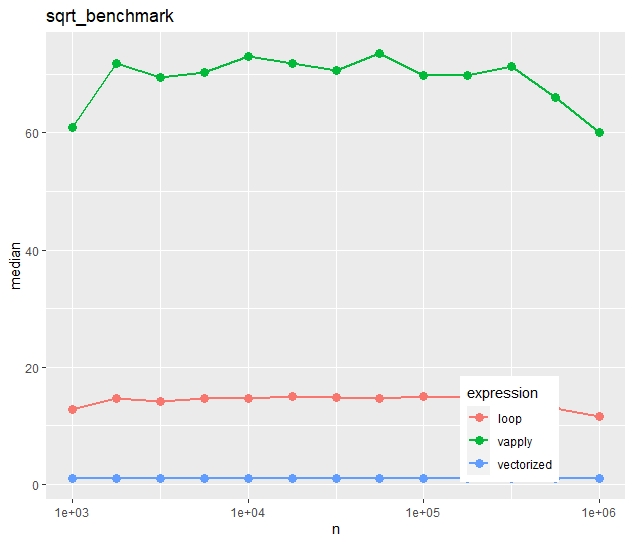
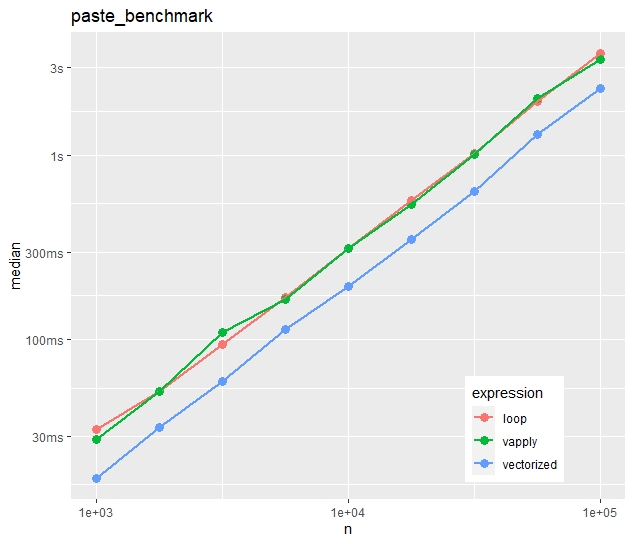
The three approaches are then compared via bench::mark() regarding their speed for different numbers n of vector lengths. The results are then compared first regarding absolute median times, and secondly (using an independent run), on a relative scale (1 is the vectorized approach).
R
library(tidyverse)
library(bench)

# Calculate square root for each element in loop
sqrt_loop <- function(x) {
  out <- numeric(length(x))
  for (i in seq_along(x)) {
    out[i] <- sqrt(x[i])
  }
  out
}

# Example
sqrt_loop(1:4) # 1.000000 1.414214 1.732051 2.000000

# Compare its performance with two alternatives
sqrt_benchmark <- function(n) {
  x <- rexp(n)
  mark(
    vectorized = sqrt(x),
    loop = sqrt_loop(x),
    vapply = vapply(x, sqrt, FUN.VALUE = 0.0),
    # relative = TRUE
  )
}

# Combine results of multiple benchmarks and plot results
multiple_benchmarks <- function(one_bench, N) {
  res <- vector("list", length(N))
  for (i in seq_along(N)) {
    res[[i]] <- one_bench(N[i]) %>%
      mutate(n = N[i], expression = names(expression))
  }

  ggplot(bind_rows(res), aes(n, median, color = expression)) +
    geom_point(size = 3) +
    geom_line(size = 1) +
    scale_x_log10() +
    ggtitle(deparse1(substitute(one_bench))) +
    theme(legend.position = c(0.8, 0.15))
}

# Apply simulation
multiple_benchmarks(sqrt_benchmark, N = 10^seq(3, 6, 0.25))
Absolute timings
Absolute median times on the “sqrt()” task
Relative timings (using a second run)
Relative median times of a separate run on the “sqrt()” task
We see:
Run times increase quite linearly with vector size.
Vectorization is more than ten times faster than the naive loop.
Most strikingly, vapply() is much slower than the naive loop. Would you have thought this?
Example 2: paste()
For the second example, we use a less simple function, namely
paste(“Number”, prettyNum(x, digits = 5))
What will our three approaches (vectorized, naive loop, vapply) show on this task?
R
pretty_paste <- function(x) {
  paste("Number", prettyNum(x, digits = 5))
}

# Example
pretty_paste(pi) # "Number 3.1416"

# Again, call pretty_paste() for each element in a loop
paste_loop <- function(x) {
  out <- character(length(x))
  for (i in seq_along(x)) {
    out[i] <- pretty_paste(x[i])
  }
  out
}

# Compare its performance with two alternatives
paste_benchmark <- function(n) {
  x <- rexp(n)
  mark(
    vectorized = pretty_paste(x),
    loop = paste_loop(x),
    vapply = vapply(x, pretty_paste, FUN.VALUE = ""),
    # relative = TRUE
  )
}

multiple_benchmarks(paste_benchmark, N = 10^seq(3, 5, 0.25))
Absolute timings
Absolute median times on the “paste()” task
Relative timings (using a second run)
Relative median times of a separate run on the “paste()” task
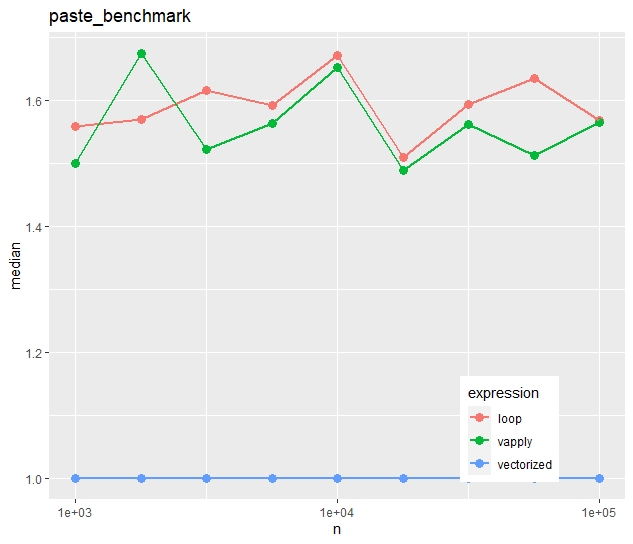
In contrast to the first example, vapply() is now as fast as the naive loop.
The time advantage of the vectorized approach is much less impressive. The loop takes in median only 50% longer.
Conclusion
Vectorization is fast and easy to read. If available, use this. No surprise.
If you use vapply/sapply/lapply, do it for the style, not for the speed. In some cases, the loop will be faster. And, depending on the situation and the audience, a loop might actually be even easier to read.
Besides the many negative aspects of going through a pandemic, there are also certain positive ones like having time to write short blog posts like this.
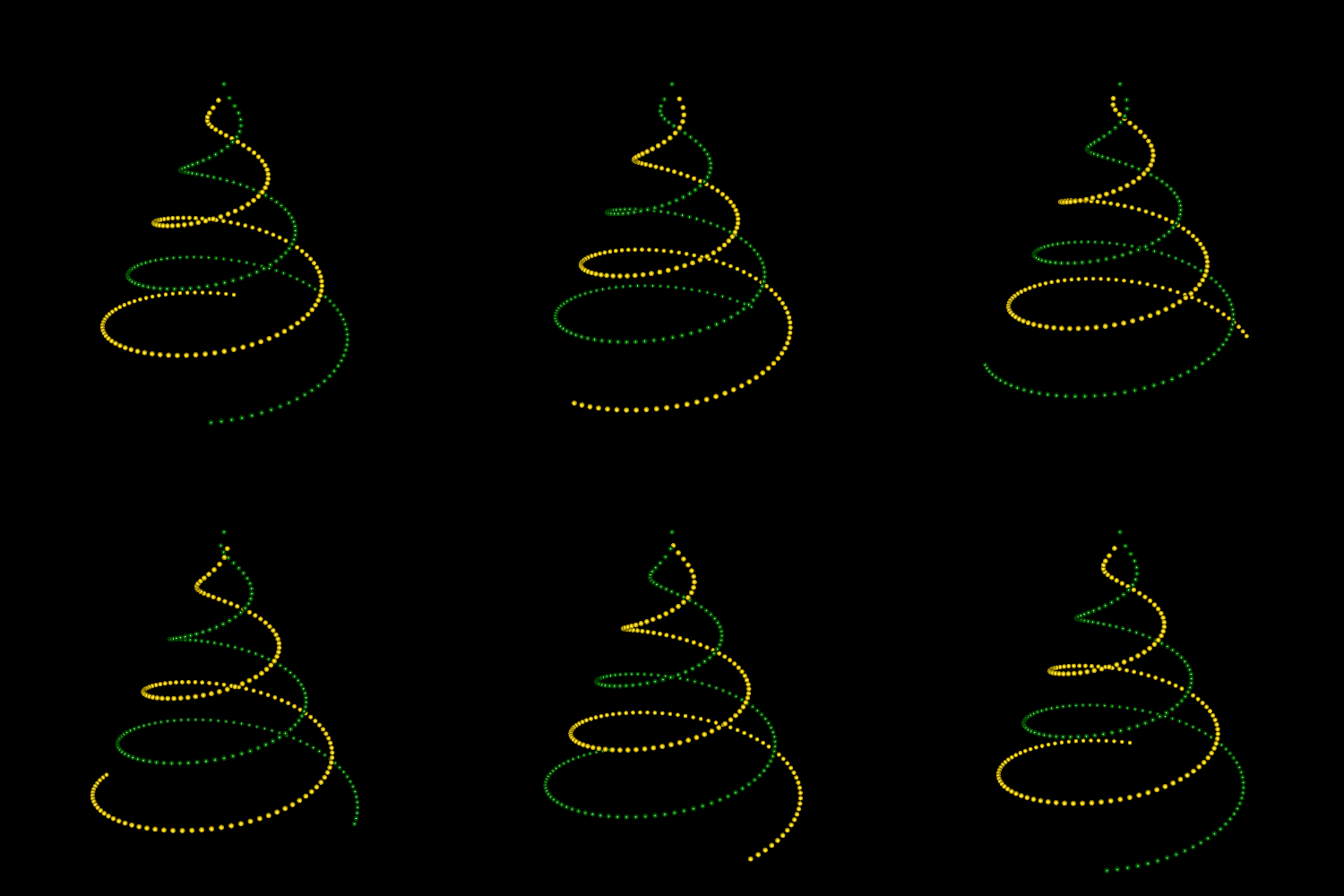
This one picks up a topic that was intensively discussed a couple of years ago on Wolfram’s page: Namely that the damped sine wave
f(t) = t sin(t)
can be used to draw a Christmas tree. Throw in some 3D animation using the R package rgl and the tree begins to become virtual reality…
Here is our version using just ten lines of R code:
R
library(rgl)

t <- seq(0, 100, by = 0.7)^0.6
x <- t * c(sin(t), sin(t + pi))
y <- t * c(cos(t), cos(t + pi))
z <- -2 * c(t, t)
color <- rep(c("darkgreen", "gold"), each = length(t))

open3d(windowRect = c(100, 100, 600, 600), zoom = 0.9)
bg3d("black")
spheres3d(x, y, z, radius = 0.3, color = color)

# On screen (skip if export)
play3d(spin3d(axis = c(0, 0, 1), rpm = 4))

# Export (requires 3rd party tool "ImageMagick" resp. magick-package)
# movie3d(spin3d(axis = c(0, 0, 1), rpm = 4), duration = 30, dir = getwd())
Exported as gif using magick
Christian and me wish you a relaxing time over Christmas. Take care of the people you love and stay healthy and safe.
This is the next article in our series “Lost in Translation between R and Python”. The aim of this series is to provide high-quality R and Python 3 code to achieve some non-trivial tasks. If you are to learn R, check out the R tab below. Similarly, if you are to learn Python, the Python tab will be your friend.
Monotonic constraints
On ML competition platforms like Kaggle, complex and unintuitively behaving models dominate. In this respect, reality is completely different. There, the majority of models do not serve as pure prediction machines but rather as fruitful source of information. Furthermore, even if used as prediction machine, the users of the models might expect a certain degree of consistency when “playing” with input values.
A classic example are statistical house appraisal models. An additional bathroom or an additional square foot of ground area is expected to raise the appraisal, everything else being fixed (ceteris paribus). The user might lose trust in the model if the opposite happens.
One way to enforce such consistency is to monitor the signs of coefficients of a linear regression model. Another useful strategy is to impose monotonicity constraints on selected model effects.
Trees and monotonic constraints
Monotonicity constraints are especially simple to implement for decision trees. The rule is basically as follows: If a monotonicity constraint would be violated by a split on feature X, it is rejected. (Or a large penalty is subtracted from the corresponding split gain.) This will imply monotonic behavior of predictions in X, keeping all other features fixed.
Tree ensembles like boosted trees or random forests will automatically inherit this property.
Boosted trees
Most implementations of boosted trees offer monotonicity constraints. Here is a selection:
Unfortunately, the picture is completely different for random forests. At the time of writing, I am not aware of any random forest implementation in R or Python offering this useful feature.
Some options
Implement monotonic constrainted random forests from scratch.
Ask for this feature in existing implementations.
Be creative and use XGBoost to emulate random forests.
For the moment, let’s stick to option 3. In our last R <-> Python blog post, we demonstrated that XGBoost’s random forest mode works essentially as good as standard random forest implementations, at least in regression settings and using sensible defaults.
Warning: Be careful with imposing monotonicity constraints
Ask yourself: does the constraint really make sense for all possible values of other features? You will see that the answer is often “no”.
An example: If your house price model uses the features “number of rooms” and “living area”, then a monotonic constraint on “living area” might make sense (given any number of rooms), while such constraint would be non-sensical for the number of rooms. Why? Because having six rooms in a 1200 square feet home is not necessarily better than having just five rooms in an equally sized home.
Let’s try it out
We use a nice dataset containing information on over 20,000 sold houses in Kings County. Along with the sale price, different features describe the size and location of the properties. The dataset is available on OpenML.org with ID 42092.
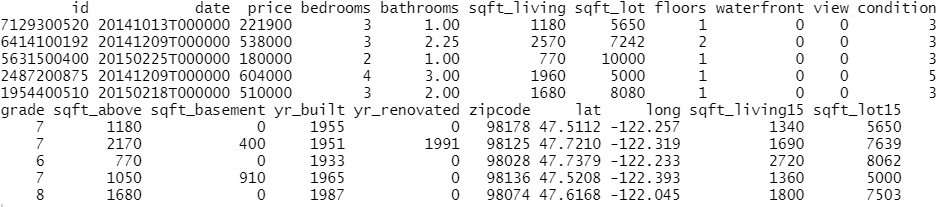
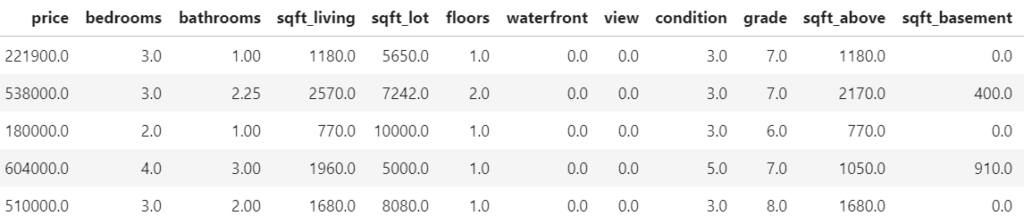
Some rows and columns from the Kings County house dataset.
The following R and Python codes
fetch the data,
prepare the ML setting,
fit unconstrained XGBoost random forests using log sales price as response,
and visualize the effect of log ground area by individual conditional expectation (ICE) curves.
An ICE curve for variable X shows how the prediction of one specific observation changes if the value of X changes. Repeating this for multiple observations gives an idea of the effect of X. The average over multiple ICE curves produces the famous partial dependent plot.
R
Python
library(farff)
library(OpenML)
library(dplyr)
library(xgboost)

set.seed(83454)

rmse <- function(y, pred) {
  sqrt(mean((y-pred)^2))
}

# Load King Country house prices dataset on OpenML
# ID 42092, https://www.openml.org/d/42092
df <- getOMLDataSet(data.id = 42092)$data
head(df)

# Prepare
df <- df %>%
  mutate(
    log_price = log(price),
    log_sqft_lot = log(sqft_lot),
    year = as.numeric(substr(date, 1, 4)),
    building_age = year - yr_built,
    zipcode = as.integer(as.character(zipcode))
  )

# Define response and features
y <- "log_price"
x <- c("grade", "year", "building_age", "sqft_living",
       "log_sqft_lot", "bedrooms", "bathrooms", "floors", "zipcode",
       "lat", "long", "condition", "waterfront")

# random split
ix <- sample(nrow(df), 0.8 * nrow(df))
y_test <- df[[y]][-ix]

# Fit untuned, but good(!) XGBoost random forest
dtrain <- xgb.DMatrix(data.matrix(df[ix, x]),
                      label = df[ix, y])

params <- list(
  objective = "reg:squarederror",
  learning_rate = 1,
  num_parallel_tree = 500,
  subsample = 0.63,
  colsample_bynode = 1/3,
  reg_lambda = 0,
  max_depth = 20,
  min_child_weight = 2
)

system.time( # 25 s
  unconstrained <- xgb.train(
    params,
    data = dtrain,
    nrounds = 1,
    verbose = 0
  )
)

pred <- predict(unconstrained, data.matrix(df[-ix, x]))

# Test RMSE: 0.172
rmse(y_test, pred)

# ICE curves via our flashlight package
library(flashlight)

pred_xgb <- function(m, X) predict(m, data.matrix(X[, x]))

fl <- flashlight(
  model = unconstrained,
  label = "unconstrained",
  data = df[ix, ],
  predict_function = pred_xgb
)

light_ice(fl, v = "log_sqft_lot", indices = 1:9,
          evaluate_at = seq(7, 11, by = 0.1)) %>%
  plot()
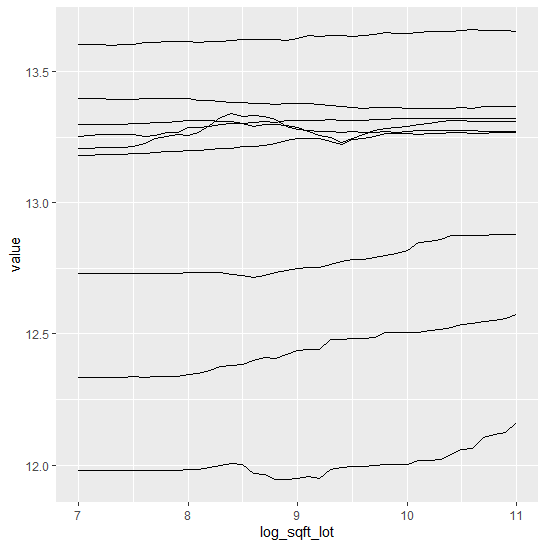
Figure 1 (R output): ICE curves of log(ground area) for the first nine observations. Many non-monotonic parts are visible.
We clearly see many non-monotonic (and in this case counterintuitive) ICE curves.
What would a model give with monotonically increasing constraint on the ground area?
R
Python
# Monotonic increasing constraint
(params$monotone_constraints <- 1 * (x == "log_sqft_lot"))

system.time( #  179s
  monotonic <- xgb.train(
    params,
    data = dtrain,
    nrounds = 1,
    verbose = 0
  )
)

pred <- predict(monotonic, data.matrix(df[-ix, x]))

# Test RMSE: 0.176
rmse(y_test, pred)

fl_m <- flashlight(
  model = monotonic,
  label = "monotonic",
  data = df[ix, ],
  predict_function = pred_xgb
)

light_ice(fl_m, v = "log_sqft_lot", indices = 1:9,
          evaluate_at = seq(7, 11, by = 0.1)) %>%
  plot()
# One needs to pass the constraints as single string, which is rather ugly
mc = "(" + ",".join([str(int(x == "log_sqft_lot")) for x in xvars]) + ")"
print(mc)

# Modeling - wall time 49 seconds
constrained = XGBRFRegressor(monotone_constraints=mc, **param_dict)
constrained.fit(X_train, y_train)

# Test RMSE: 0.178
pred = constrained.predict(X_test)
print(f"RMSE: {mean_squared_error(y_test, pred, squared=False):.03f}")

# ICE and PDP - wall time 39 seconds
PartialDependenceDisplay.from_estimator(
    constrained,
    X=X_train,
    features=["log_sqft_lot"],
    kind="both",
    subsample=20,
    random_state=1,
)
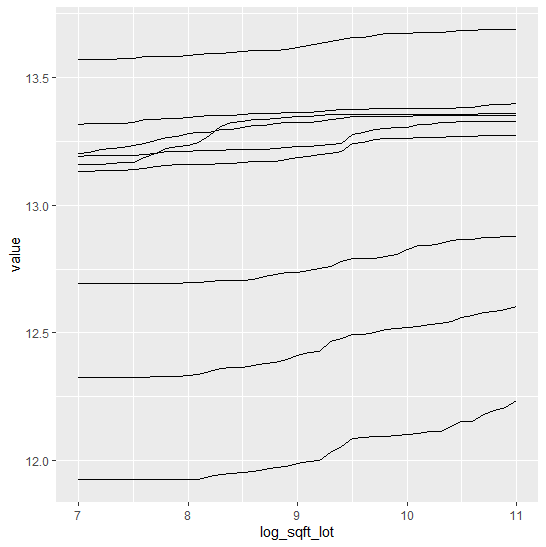
Figure 2 (R output): ICE curves of the same observations as in Figure 1, but now with monotonic constraint. All curves are monotonically increasing.
We see:
It works! Each ICE curve in log(lot area) is monotonically increasing. This means that predictions are monotonically increasing in lot area, keeping all other feature values fixed.
The model performance is slightly worse. This is the price paid for receiving a more intuitive behaviour in an important feature.
In Python, both models take about the same time to fit (30-40 s on a 4 core i7 CPU laptop). Curiously, in R, the constrained model takes about six times longer to fit than the unconstrained one (170 s vs 30 s).
Summary
Monotonic constraints help to create intuitive models.
Unfortunately, as per now, native random forest implementations do not offer such constraints.
Using XGBoost’s random forest mode is a temporary solution until native random forest implementations add this feature.
Be careful to add too many constraints: does a constraint really make sense for all other (fixed) choices of feature values?
Recently, together with Yang Liu, we have been investing some time to extend the R package SHAPforxgboost. This package is designed to make beautiful SHAP plots for XGBoost models, using the native treeshap implementation shipped with XGBoost.
Some of the new features of SHAPforxgboost
Added support for LightGBM models, using the native treeshap implementation for LightGBM. So don’t get tricked by the package name “SHAPforxgboost” :-).
The function shap.plot.dependence() has received the option to select the heuristically strongest interacting feature on the color scale, see last section for details.
shap.plot.dependence() now allows jitter and alpha transparency.
The new function shap.importance() returns SHAP importances without plotting them.
An interesting alternative to calculate and plot SHAP values for different tree-based models is the treeshap package by Szymon Maksymiuk et al. Keep an eye on this one – it is actively being developed!
What is SHAP?
A couple of years ago, the concept of Shapely values from game theory from the 1950ies was discovered e.g. by Scott Lundberg as an interesting approach to explain predictions of ML models.
The basic idea is to decompose a prediction in a fair way into additive contributions of features. Repeating the process for many predictions provides a brilliant way to investigate the model as a whole.
The main resource on the topic is Scott Lundberg’s site. Besides this, I’d recomment to go through these two fantastic blog posts, even if you already know what SHAP values are:
As an example, we will try to model log house prices of 20’000 sold houses in Kings County. The dataset is available e.g. on OpenML.org under ID 42092.
Some rows and columns from the Kings County house dataset.
Fetch and prepare data
We start by downloading the data and preparing it for modelling.
R
library(farff)
library(OpenML)
library(dplyr)
library(xgboost)
library(ggplot2)
library(SHAPforxgboost)

# Load King Country house prices dataset on OpenML
# ID 42092, https://www.openml.org/d/42092
df <- getOMLDataSet(data.id = 42092)$data
head(df)

# Prepare
df <- df %>%
  mutate(
    log_price = log(price),
    log_sqft_lot = log(sqft_lot),
    year = as.numeric(substr(date, 1, 4)),
    building_age = year - yr_built,
    zipcode = as.integer(as.character(zipcode))
  )

# Define response and features
y <- "log_price"
x <- c("grade", "year", "building_age", "sqft_living",
       "log_sqft_lot", "bedrooms", "bathrooms", "floors", "zipcode",
       "lat", "long", "condition", "waterfront")

# random split
set.seed(83454)
ix <- sample(nrow(df), 0.8 * nrow(df))
Fit XGBoost model
Next, we fit a manually tuned XGBoost model to the data.
The resulting model consists of about 600 trees and reaches a validation RMSE of 0.16. This means that about 2/3 of the predictions are within 16% of the observed price, using the empirical rule.
Compact SHAP analysis
ML models are rarely of any use without interpreting its results, so let’s use SHAP to peak into the model.
The analysis includes a first plot with SHAP importances. Then, with decreasing importance, dependence plots are shown to get an impression on the effects of each feature.
R
# Step 1: Select some observations
X <- data.matrix(df[sample(nrow(df), 1000), x])

# Step 2: Crunch SHAP values
shap <- shap.prep(fit_xgb, X_train = X)

# Step 3: SHAP importance
shap.plot.summary(shap)

# Step 4: Loop over dependence plots in decreasing importance
for (v in shap.importance(shap, names_only = TRUE)) {
  p <- shap.plot.dependence(shap, v, color_feature = "auto",
                            alpha = 0.5, jitter_width = 0.1) +
    ggtitle(v)
  print(p)
}
Some of the plots are shown below. The code actually produces all plots, see the corresponding html output on github.
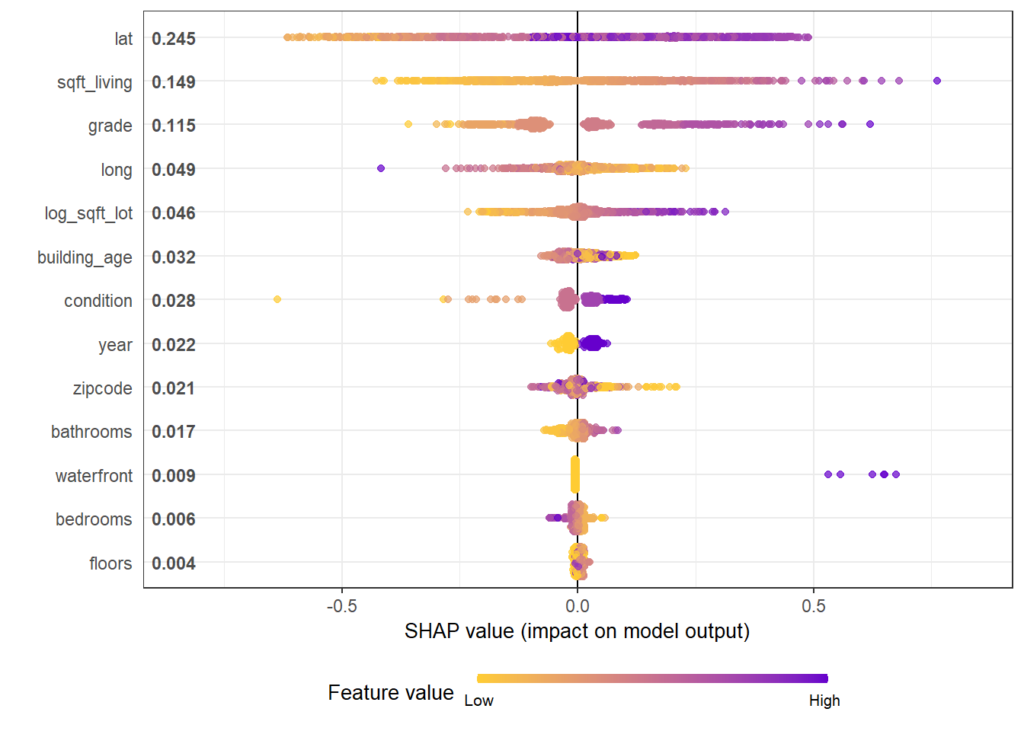
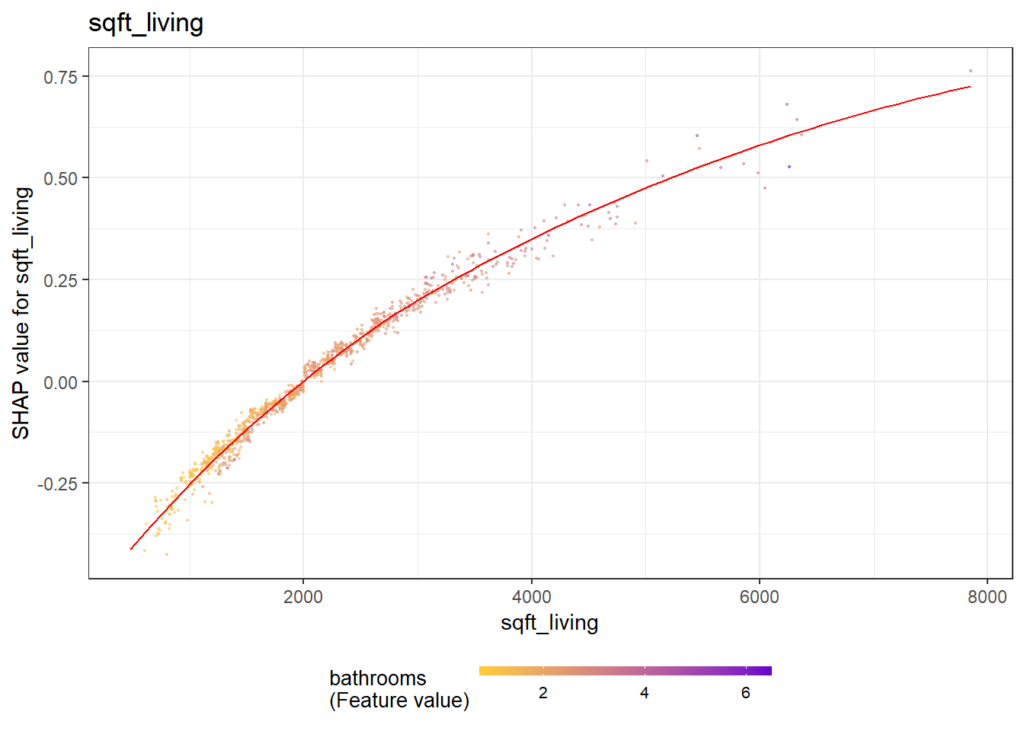
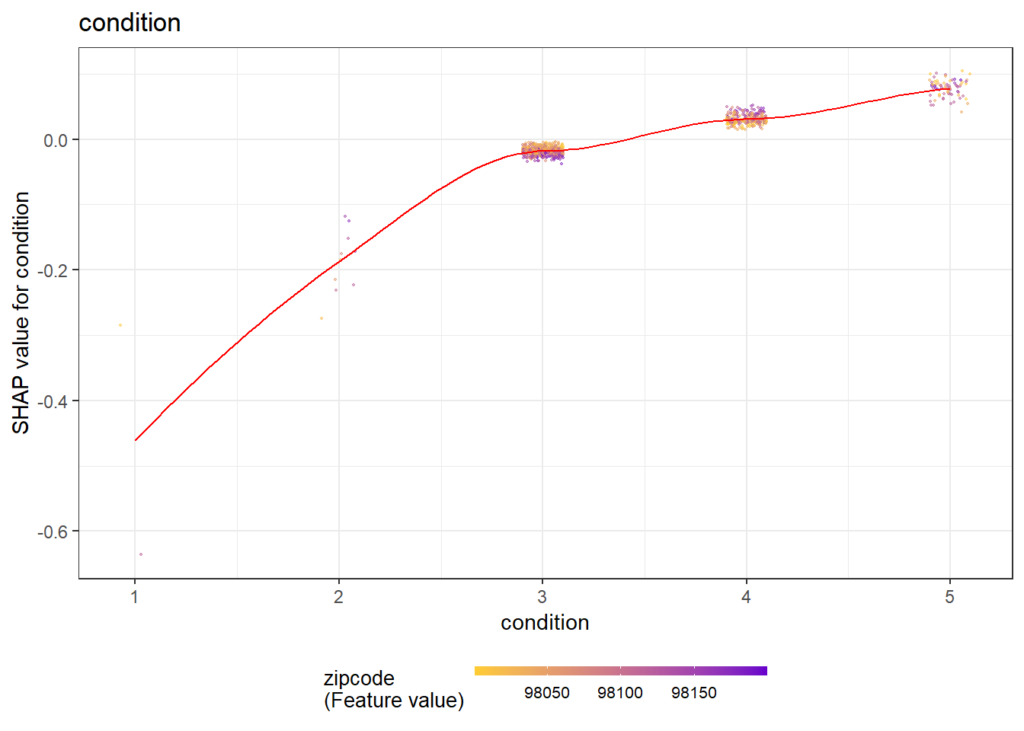
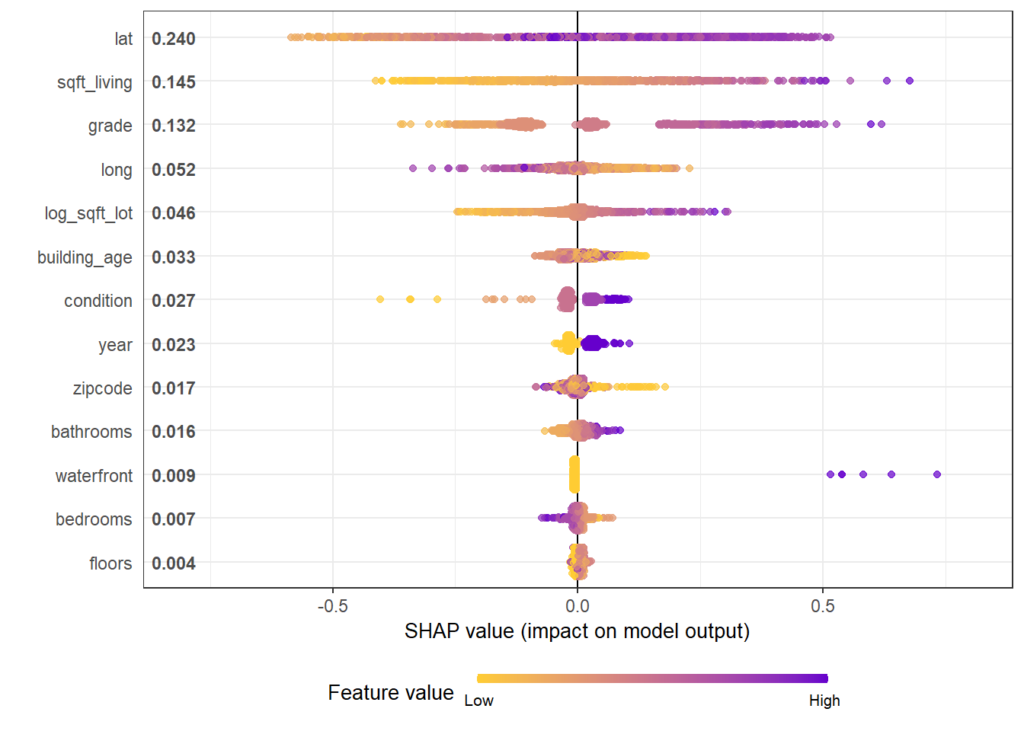
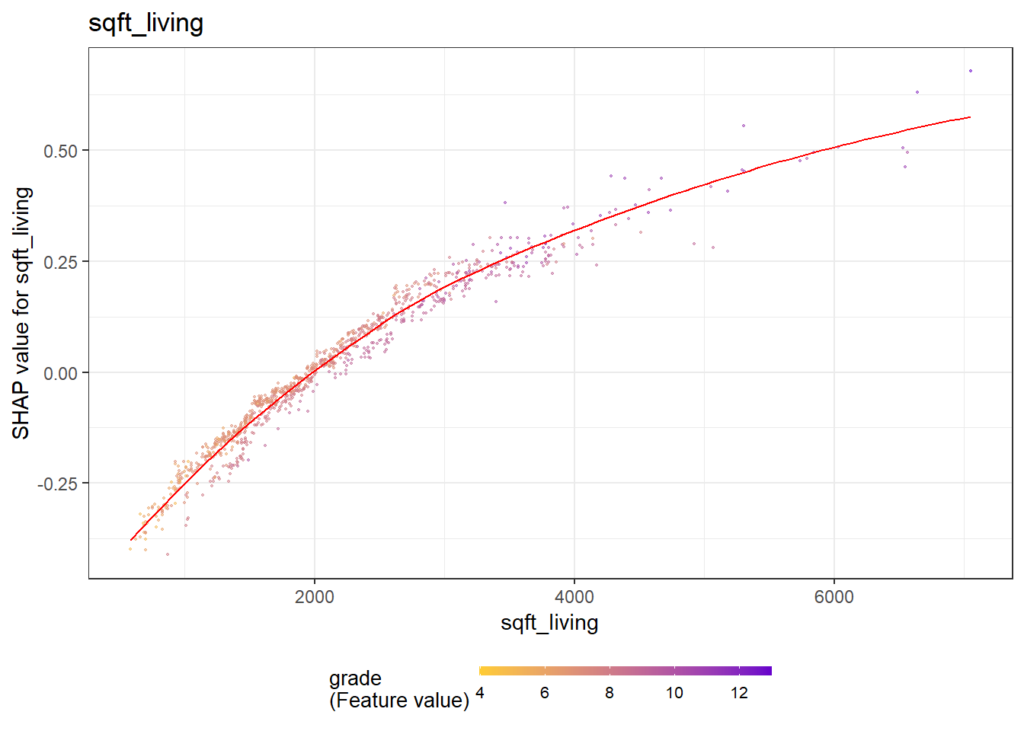
Figure 1: SHAP importance for XGBoost model. The results make intuitive sense. Location and size are among the strongest predictors.Figure 2: SHAP dependence for the second strongest predictor. The larger the living area, the higher the log price. There is not much vertical scatter, indicating that living area acts quite additively on the predictions on the log scale.Figure 3: SHAP dependence for a less important predictor. The effect of “condition” 4 vs 3 seems to depend on the zipcode (see the color). For some zipcodes, the condition does not have a big effect on the price, while for other zipcodes, the effect is clearly higher.
Same workflow for LightGBM
Let’s try out the SHAPforxgboost package with LightGBM.
Note: LightGBM Version 3.2.1 on CRAN is not working properly under Windows. This will be fixed in the next release of LightGBM. As a temporary solution, you need to build it from the current master branch.
Early stopping on the validation data selects about 900 trees as being optimal and results in a validation RMSE of also 0.16.
SHAP analysis
We use exactly the same short snippet to analyze the model by SHAP.
R
X <- data.matrix(df[sample(nrow(df), 1000), x])
shap <- shap.prep(fit_lgb, X_train = X)
shap.plot.summary(shap)

for (v in shap.importance(shap, names_only = TRUE)) {
  p <- shap.plot.dependence(shap, v, color_feature = "auto",
                            alpha = 0.5, jitter_width = 0.1) +
    ggtitle(v)
  print(p)
}
Again, we only show some of the output and refer to the html of the corresponding rmarkdown. Overall, the model seems to be very similar to the one obtained by XGBoost.
Figure 4: SHAP importance for LightGBM. By chance, the order of importance is the same as for XGBoost.Figure 5: The dependence plot for the living area also looks identical in shape than for the XGBoost model.
How does the dependence plot selects the color variable?
By default, Scott’s shap package for Python uses a statistical heuristic to colorize the points in the dependence plot by the variable with possibly strongest interaction. The heuristic used by SHAPforxgboost is slightly different and directly uses conditional variances. More specifically, the variable X on the x-axis as well as each other feature Z_k is binned into categories. Then, for each Z_k, the conditional variance across binned X and Z_k is calculated. The Z_k with the highest conditional variance is selected as the color variable.
Note that the heuristic does not depend on “shap interaction values” in order to save time (and because these would not be available for LightGBM).
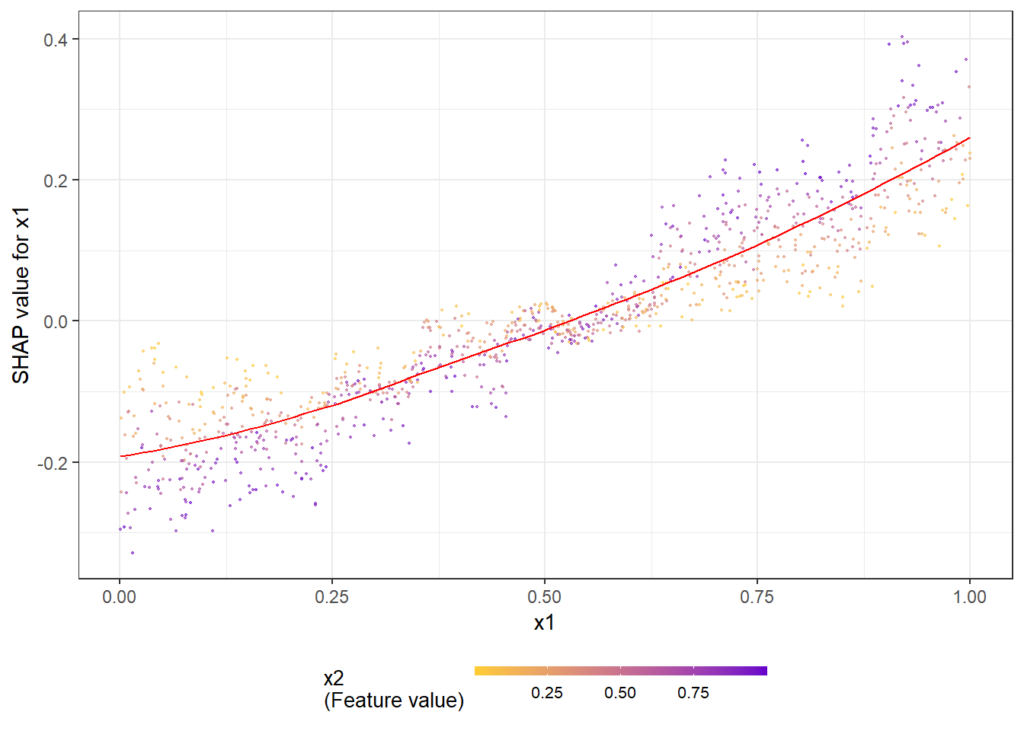
The following simple example shows how/that it is working. First, a dataset is created and a model with three features and strong interaction between x1 and x2 is being fitted. Then, we look at the dependence plots to see if it is consistent with the model/data situation.
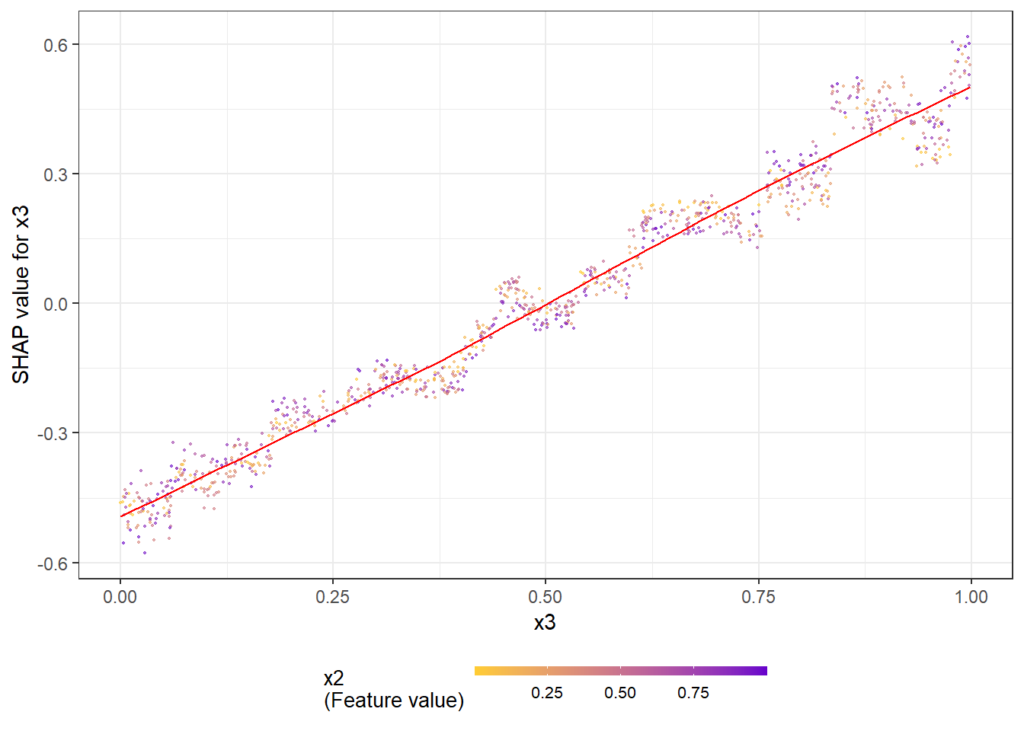
Figure 6: The dependence plots for x1 shows a clear interaction effect with the color variable x2. This is as simulated in the data.Figure 7: The dependence plots for x3 does not show clear interaction effects, consistent with the data situation.
The full R script and rmarkdown file of this post can be found on github.