Author: Michael Mayer

  • Strong Random Forests with XGBoost

    Lost in Translation between R and Python 6

    Hello random forest friends

    This is the next article in our series “Lost in Translation between R and Python”. The aim of this series is to provide high-quality R and Python 3 code to achieve some non-trivial tasks. If you are to learn R, check out the R tab below. Similarly, if you are to learn Python, the Python tab will be your friend.

    The last one was on diamond duplicates and grouped sampling.

    XGBoost’s random forests

    For sure, XGBoost is well known for its excellent gradient boosting trees implementation. Although less obvious, it is no secret that it also offers a way to fit single trees in parallel, emulating random forests, see the great explanations on the official XGBoost page. Still, there seems to exist quite some confusion on how to choose certain parameters in order to get good results. It is the aim of this post to clarify this.

    Also LightGBM offers a random forest mode. We will investigate it in a later post.

    Why would you want to use XGBoost to fit a random forest?

    1. Interaction & monotonic constraints are available for XGBoost, but typically not for random forest implementations. A separate post will follow to illustrate this in the random forest setting.
    2. XGBoost can natively deal with missing values in an elegant way, unlike many random forest algorithms.
    3. You can stick to the same data preparation pipeline.

    I had additional reasons in mind, e.g. using non-standard loss functions, but this did not turn out to work well. This is possibly due to the fact that XGBoost uses a quadratic approximation to the loss, which is exact only for the mean squared error loss (MSE).

    How to enable the ominous random forest mode?

    Following the official explanations, we would need to set

    • num_parallel_tree to the number of trees in the forest,
    • learning_rate and num_boost_round to 1.

    There are further valuable tips, e.g. to set row and column subsampling to values below one to resemble true random forests.

    Still, most of the regularization parameters of XGBoost tend to favour simple trees, while the idea of a random forest is to aggregate deep, overfitted trees. These regularization parameters have to be changed as well in order to get good results.

    So voila my suggestions.

    Suggestions for parameters

    • learning_rate=1 (see above)
    • num_boost_round=1 (see above)
      Has to be set in train(), not in the parameter list. It is called nrounds in R.
    • subsample=0.63
      A random forest draws a bootstrap sample to fit each tree. This means about 0.63 of the rows will enter one or multiple times into the model, leaving 37% out. While XGBoost does not offer such sampling with replacement, we can still introduce the necessary randomness in the dataset used to fit a tree by skipping 37% of the rows per tree.
    • colsample_bynode=floor(sqrt(m))/m
      Column subsampling per split is the main source of randomness in a random forest. A good default is usually to sample the square root of the number of features m or m/3. XGBoost offers different colsample_by* parameters, but it is important to sample per split resp. per node, not by tree. Otherwise, it might happen that important features are missing in a tree altogether, leading to overall bad predictions.
    • num_parallel_tree
      The number of trees. Native implementations of random forests usually use a default value between 100 and 500. The more, the better—but slower.
    • reg_lambda=0
      XGBoost uses a default L2 penalty of 1! This will typically lead to shallow trees, colliding with the idea of a random forest to have deep, wiggly trees. In my experience, leaving this parameter at its default will lead to extremely bad XGBoost random forest fits.
      Set it to zero or a value close to zero.
    • max_depth=20
      Random forests usually train very deep trees, while XGBoost’s default is 6. A value of 20 corresponds to the default in the h2o random forest, so let’s go for their choice.
    • min_child_weight=2
      The default of XGBoost is 1, which tends to be slightly too greedy in random forest mode. For binary classification, you would need to set it to a value close or equal to 0.

    Of course these parameters can be tuned by cross-validation, but one of the reasons to love random forests is their good performance even with default parameters.

    Compared to optimized random forests, XGBoost’s random forest mode is quite slow. At the cost of performance, choose

    • lower max_depth,
    • higher min_child_weight, and/or
    • smaller num_parallel_tree.

    Let’s try it out with regression

    We will use a nice house price dataset, consisting of information on over 20,000 sold houses in Kings County. Along with the sale price, different features describe the size and location of the properties. The dataset is available on OpenML.org with ID 42092.
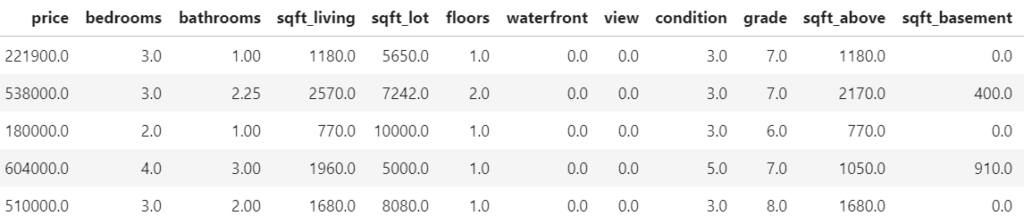
    Some rows and columns from the Kings County house dataset.

    The following R resp. Python codes fetch the data, prepare the ML setting and fit a native random forest with good defaults. In R, we use the ranger package, in Python the implementation of scikit-learn.

    The response variable is the logarithmic sales price. A healthy set of 13 variables are used as features.

    library(farff)
    library(OpenML)
    library(dplyr)
    library(ranger)
    library(xgboost)
    
    set.seed(83454)
    
    rmse <- function(y, pred) {
      sqrt(mean((y-pred)^2))
    }
    
    # Load King Country house prices dataset on OpenML
    # ID 42092, https://www.openml.org/d/42092
    df <- getOMLDataSet(data.id = 42092)$data
    head(df)
    
    # Prepare
    df <- df %>%
      mutate(
        log_price = log(price),
        year = as.numeric(substr(date, 1, 4)),
        building_age = year - yr_built,
        zipcode = as.integer(as.character(zipcode))
    )
    
    # Define response and features
    y <- "log_price"
    x <- c("grade", "year", "building_age", "sqft_living",
           "sqft_lot", "bedrooms", "bathrooms", "floors", "zipcode",
           "lat", "long", "condition", "waterfront")
    m <- length(x)
    
    # random split
    ix <- sample(nrow(df), 0.8 * nrow(df))
    
    # Fit untuned random forest
    system.time( # 3 s
      fit_rf <- ranger(reformulate(x, y), data = df[ix, ])
    )
    y_test <- df[-ix, y]
    
    # Test RMSE: 0.173
    rmse(y_test, predict(fit_rf, df[-ix, ])$pred)
    # object.size(fit_rf) # 180 MB
    # Imports
    import numpy as np
    import pandas as pd
    
    from sklearn.datasets import fetch_openml
    from sklearn.model_selection import train_test_split
    from sklearn.ensemble import RandomForestRegressor
    from sklearn.metrics import mean_squared_error
    
    
    def rmse(y_true, y_pred):
        return np.sqrt(mean_squared_error(y_true, y_pred))
      
    # Fetch data from OpenML
    df = fetch_openml(data_id=42092, as_frame=True)["frame"]
    print("Shape: ", df.shape)
    df.head()
    
    # Prepare data
    df = df.assign(
        year = lambda x: x.date.str[0:4].astype(int),
        zipcode = lambda x: x.zipcode.astype(int)
    ).assign(
        building_age = lambda x: x.year - x.yr_built,
    )
    
    # Feature list
    xvars = [
        "grade", "year", "building_age", "sqft_living", 
        "sqft_lot", "bedrooms", "bathrooms", "floors", 
        "zipcode", "lat", "long", "condition", "waterfront"
    ]
    
    # Data split
    y_train, y_test, X_train, X_test = train_test_split(
        np.log(df["price"]), df[xvars], 
        train_size=0.8, random_state=766
    )
    
    # Fit scikit-learn rf
    rf = RandomForestRegressor(
        n_estimators=500, 
        max_features="sqrt", 
        max_depth=20,
        n_jobs=-1, 
        random_state=104
    )
    
    rf.fit(X_train, y_train)  # Wall time 3 s
    
    # Test RMSE: 0.176
    print(f"RMSE: {rmse(y_test, rf.predict(X_test)):.03f}")

    Both in R and Python, the test RMSE is between 0.17 and 0.18, i.e. about 2/3 of the test predictions are within 18% of the observed value. Not bad!
    Note: The test performance depends on the split seed, so it does not make sense to directly compare the R and Python performance.

    With XGBoost’s random forest mode

    Now let’s try to reach the same performance with XGBoost’s random forest implementation using the above parameter suggestions.

    # Fit untuned, but good(!) XGBoost random forest
    dtrain <- xgb.DMatrix(data.matrix(df[ix, x]),
                          label = df[ix, y])
    
    params <- list(
      objective = "reg:squarederror",
      learning_rate = 1,
      num_parallel_tree = 500,
      subsample = 0.63,
      colsample_bynode = floor(sqrt(m)) / m,
      reg_lambda = 0,
      max_depth = 20,
      min_child_weight = 2
    )
    
    system.time( # 20 s
      fit_xgb <- xgb.train(
        params,
        data = dtrain,
        nrounds = 1,
        verbose = 0
      )
    )
    
    pred <- predict(fit_xgb, data.matrix(df[-ix, x]))
    
    # Test RMSE: 0.174
    rmse(y_test, pred)
    # xgb.save(fit_xgb, "xgb.model") # 140 MB
    import xgboost as xgb
    
    dtrain = xgb.DMatrix(X_train, label=y_train)
    
    m = len(xvars)
    
    params = dict(
        objective="reg:squarederror",
        learning_rate=1,
        num_parallel_tree=500,
        subsample=0.63,
        colsample_bynode=int(np.sqrt(m))/m,
        reg_lambda=0,
        max_depth=20,
        min_child_weight=2
    )
    
    rf_xgb = xgb.train(  # Wall time 34 s
        params, 
        dtrain, 
        num_boost_round=1
    )
    preds = rf_xgb.predict(xgb.DMatrix(X_test))
    
    # 0.177
    print(f"RMSE: {rmse(y_test, preds):.03f}")

    We see:

    • The performance of the XGBoost random forest is essentially as good as the native random forest implementations. And all this without any parameter tuning!
    • XGBoost is much slower than the optimized random forest implementations. If this is a problem, e.g. reduce the tree depth. In this example, Python takes almost twice as much time as R. No idea why!
      The timings were made on a usual 4 core i7 processor.
    • Disk space required to store the model objects is comparable between XGBoost and native random forest implementations.

    What if you would run the same model with XGBoost defaults?

    • With default reg_lambda=1:
      The performance would end up at a catastrophic RMSE of 0.35!
    • With default max_depth=6:
      The RMSE would be much worse (0.23) as well.
    • With colsample_bytree instead of colsample_bynode:
      The RMSE would deteriorate to 0.27.

    Thus: It is essential to set some values to a good “random forest” default!

    Does it always work that good?

    Definitively not in classification settings. However, in regression settings with the MSE loss, XGBoost’s random forest mode is often as accurate as native implementations.

    • Classification models
      In my experience, the XGBoost random forest mode does not work as good as a native random forest for classification, possibly due to the fact that it uses only an approximation to the loss function.
    • Other regression examples
      Using the setting of our last “R <–> Python” post (diamond duplicates and grouped sampling) and the same parameters as above, we get the following test RMSEs: With ranger (R code in link below): 0.1043, with XGBoost: 0.1042. Sweet!

    Wrap up

    • With the right default parameters, XGBoost’s random forest mode reaches similar performance on regression problems than native random forest packages. Without any tuning!
    • For losses other than MSE, it does not work so well.

    The Python notebook and R code can be found at:
  • A Curious Fact on the Diamonds Dataset

    Lost in Translation between R and Python 5

    Hello regression world

    This is the next article in our series “Lost in Translation between R and Python”. The aim of this series is to provide high-quality R and Python 3 code to achieve some non-trivial tasks. If you are to learn R, check out the R tab below. Similarly, if you are to learn Python, the Python tab will be your friend.

    The last two included a deep dive into historic mortality rates as well as studying a beautiful regression formula.

    Diamonds data

    One of the most used datasets to teach regression is the diamonds dataset. It describes 54’000 diamonds by

    • their price,
    • the four “C” variables (carat, color, cut, clarity),
    • as well as by perspective measurements table, depth, x, y, and z.

    The dataset is readily available, e.g. in

    • R package ggplot2,
    • Python package plotnine,
    • and the fantastic OpenML database.

    Question: How many times did you use diamonds data to compare regression techniques like random forests and gradient boosting?

    Answer: Probably a lot!

    The curious fact

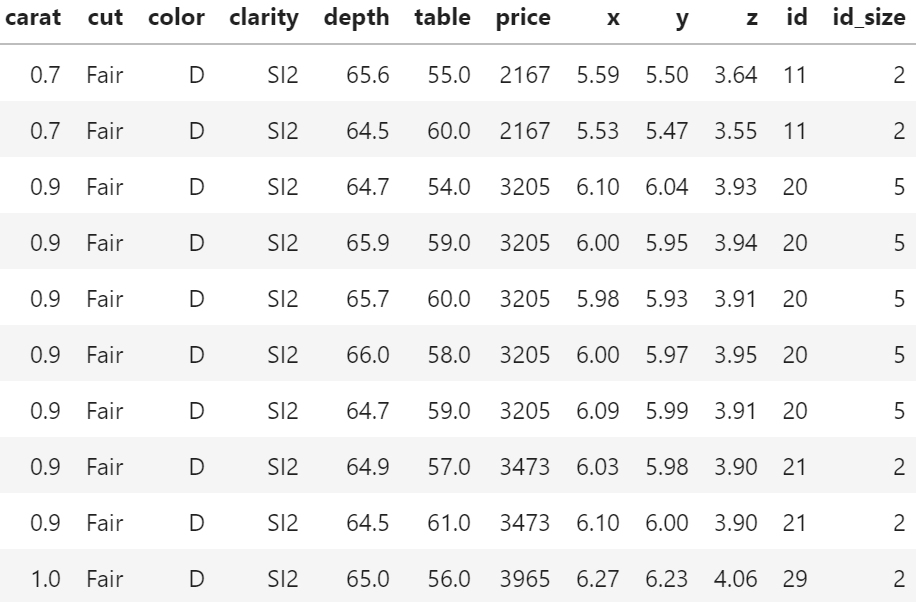
    We recently stumbled over a curious fact regarding that dataset. 26% of the diamonds are duplicates regarding price and the four “C” variables. Within duplicates, the perspective variables table, depth, x, y, and z would differ as if a diamond had been measured from different angles.

    In order to illustrate the issue, let us add the two auxilary variables

    • id: group id of diamonds with identical price and four “C”, and
    • id_size: number of rows in that id

    to the dataset and consider a couple of examples. You can view both R and Python code – but the specific output will differ because language specific naming of group ids.

    library(tidyverse)
    
    # We add group id and its size
    dia <- diamonds %>% 
      group_by(carat, cut, clarity, color, price) %>% 
      mutate(id = cur_group_id(),
             id_size = n()) %>% 
      ungroup() %>% 
      arrange(id)
    
    # Proportion of duplicates
    1 - max(dia$id) / nrow(dia)  # 0.26
    
    # Some examples
    dia %>% 
      filter(id_size > 1) %>%
      head(10)
    
    # Most frequent
    dia %>% 
      arrange(-id_size) %>% 
      head(.$id_size[1])
    
    # A random large diamond appearing multiple times
    dia %>% 
      filter(id_size > 3) %>% 
      arrange(-carat) %>% 
      head(.$id_size[1])
    import numpy as np
    import pandas as pd
    from plotnine.data import diamonds
    
    # Variable groups
    cat_vars = ["cut", "color", "clarity"]
    xvars = cat_vars + ["carat"]
    all_vars = xvars + ["price"]
    
    print("Shape: ", diamonds.shape)
    
    # Add id and id_size
    df = diamonds.copy()
    df["id"] = df.groupby(all_vars).ngroup()
    df["id_size"] = df.groupby(all_vars)["price"].transform(len)
    df.sort_values("id", inplace=True)
    
    print(f'Proportion of dupes: {1 - df["id"].max() / df.shape[0]:.0%}')
    
    print("Random examples")
    print(df[df.id_size > 1].head(10))
    
    print("Most frequent")
    print(df.sort_values(["id_size", "id"]).tail(13))
    
    print("A random large diamond appearing multiple times")
    df[df.id_size > 3].sort_values("carat").tail(6)
    Table 1: Some duplicates in the four “C” variables and price (Python output).
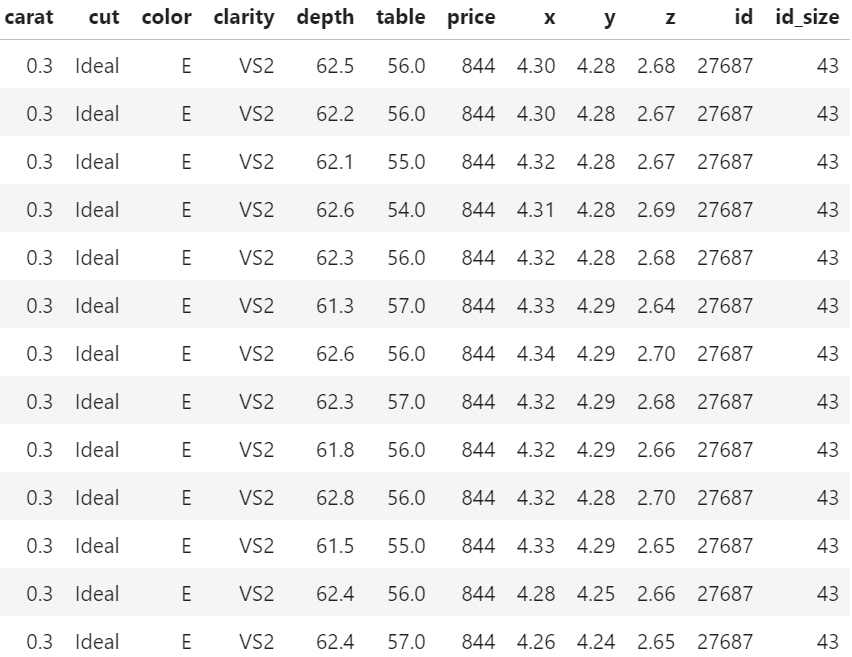
    Table 2: One of the two(!) diamonds appearing a whopping 43 times (Python output).
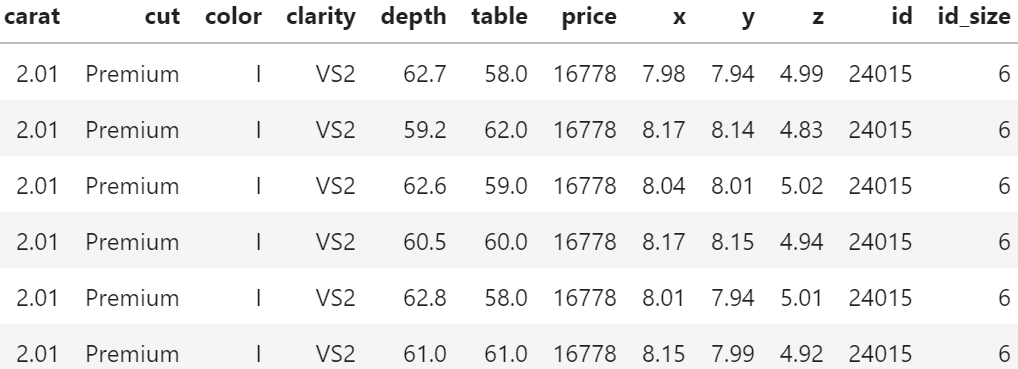
    Table 3: A large, 2.01 carat diamond appears six times (Python output).

    Of course, having the same id does not necessarily mean that the rows really describe the same diamond. price and the four “C”s could coincide purely by chance. Nevertheless: there are exactly six diamonds of 2.01 carat and a price of 16,778 USD in the dataset. And they all have the same color, cut and clarity. This cannot be coincidence!

    Why would this be problematic?

    In the presence of grouped data, standard validation techniques tend to reward overfitting.

    This becomes immediately clear having in mind the 2.01 carat diamond from Table 3. Standard cross-validation (CV) uses random or stratified sampling and would scatter the six rows of that diamond across multiple CV folds. Highly flexible algorithms like random forests or nearest-neighbour regression could exploit this by memorizing the price of this diamond in-fold and do very well out-of-fold. As a consequence, the stated CV performance would be too good and the choice of the modeling technique and its hyperparameters suboptimal.

    With grouped data, a good approach is often to randomly sample the whole group instead of single rows. Using such grouped splitting ensures that all rows in the same group would end up in the same fold, removing the above described tendency to overfit.

    Note 1. In our case of duplicates, a simple alternative to grouped splitting would be to remove the duplicates altogether. However, the occurrence of duplicates is just one of many situations where grouped or clustered samples appear in reality.

    Note 2. The same considerations not only apply to cross-validation but also to simple train/validation/test splits.

    Evaluation

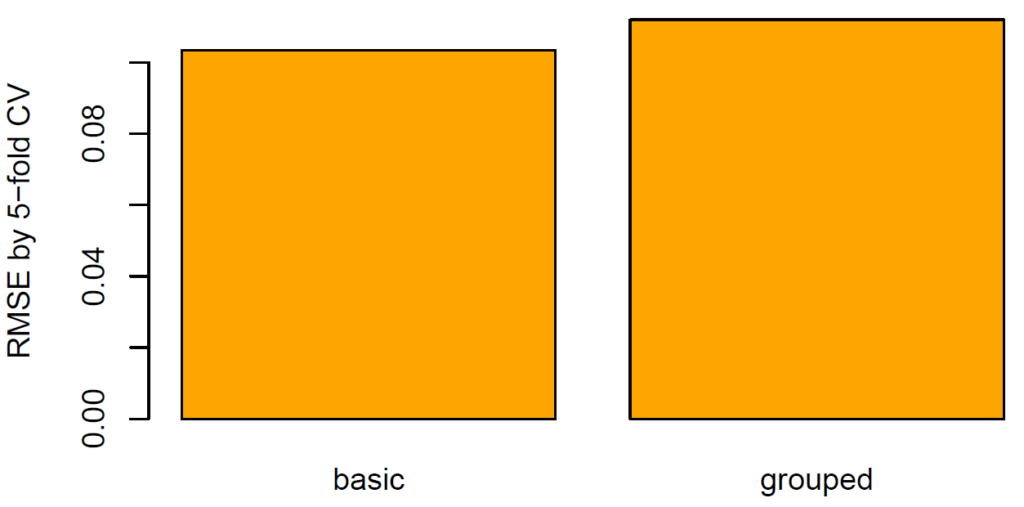
    What does this mean regarding our diamonds dataset? Using five-fold CV, we will estimate the true root-mean-squared error (RMSE) of a random forest predicting log price by the four “C”. We run this experiment twice: one time, we create the folds by random splitting and the other time by grouped splitting. How heavily will the results from random splitting be biased?

    library(ranger)
    library(splitTools) # one of our packages on CRAN
    
    set.seed(8325)
    
    # We model log(price)
    dia <- dia %>% 
      mutate(y = log(price))
    
    # Helper function: calculate rmse
    rmse <- function(obs, pred) {
      sqrt(mean((obs - pred)^2))
    }
    
    # Helper function: fit model on one fold and evaluate
    fit_on_fold <- function(fold, data) {
      fit <- ranger(y ~ carat + cut + color + clarity, data = data[fold, ])
      rmse(data$y[-fold], predict(fit, data[-fold, ])$pred)
    }
      
    # 5-fold CV for different split types
    cross_validate <- function(type, data) {
      folds <- create_folds(data$id, k = 5, type = type)
      mean(sapply(folds, fit_on_fold, data = dia))
    }
    
    # Apply and plot
    (results <- sapply(c("basic", "grouped"), cross_validate, data = dia))
    barplot(results, col = "orange", ylab = "RMSE by 5-fold CV")
    from sklearn.ensemble import RandomForestRegressor
    from sklearn.model_selection import cross_val_score, GroupKFold, KFold
    from sklearn.metrics import make_scorer, mean_squared_error
    import seaborn as sns
    
    rmse = make_scorer(mean_squared_error, squared=False)
    
    # Prepare y, X
    df = df.sample(frac=1, random_state=6345)
    y = np.log(df.price)
    X = df[xvars].copy()
    
    # Correctly ordered integer encoding
    X[cat_vars] = X[cat_vars].apply(lambda x: x.cat.codes)
    
    # Cross-validation
    results = {}
    rf = RandomForestRegressor(n_estimators=500, max_features="sqrt", 
                               min_samples_leaf=5, n_jobs=-1)
    for nm, strategy in zip(("basic", "grouped"), (KFold, GroupKFold)):
        results[nm] = cross_val_score(
            rf, X, y, cv=strategy(), scoring=rmse, groups=df.id
        ).mean()
    print(results)
    
    res = pd.DataFrame(results.items())
    sns.barplot(x=0, y=1, data=res);
    Figure 1: Test root-mean-squared error using different splitting methods (R output).

    The RMSE (11%) of grouped CV is 8%-10% higher than of random CV (10%). The standard technique therefore seems to be considerably biased.

    Final remarks

    • The diamonds dataset is not only a brilliant example to demonstrate regression techniques but also a great way to show the importance of a clean validation strategy (in this case: grouped splitting).
    • Blind or automatic ML would most probably fail to detect non-trivial data structures like in this case and therefore use inappropriate validation strategies. The resulting model would be somewhere between suboptimal and dangerous. Just that nobody would know it!
    • The first step towards a good model validation strategy is data understanding. This is a mix of knowing the data source, how the data was generated, the meaning of columns and rows, descriptive statistics etc.

    The Python notebook and R code can be found at:
  • A Beautiful Regression Formula

    Lost in Translation between R and Python 4

    Hello statistics aficionados

    This is the next article in our series “Lost in Translation between R and Python”. The aim of this series is to provide high-quality R and Python 3 code to achieve some non-trivial tasks. If you are to learn R, check out the R tab below. Similarly, if you are to learn Python, the Python tab will be your friend.

    The last one was a deep dive into historic mortality rates.

    No Covid-19, no public data for a change: This post focusses on a real beauty, namely a decomposition of the R-squared in a linear regression model

    E(y) = \alpha + \sum_{j = 1}^p x_j \beta_j

    fitted by least-squares. If the response y and all p covariables are standardized to variance 1 beforehand, then the R-squared can be obtained as the cross-product of the fitted coefficients and the usual correlations between each covariable and the response:

    R^2 = \sum_{j = 1}^p \text{cor}(y, x_j)\hat\beta_j.

    Two elegant derivations can be found in this answer to the same question, written by the number 1 contributor to crossvalidated: whuber. Look up a couple of his posts – and statistics will suddenly feel super easy and clear.

    Direct consequences of the formula are:

    1. If a covariable is uncorrelated with the response, it cannot contribute to the R-squared, i.e. neither improve nor worsen. This is not obvious.
    2. A correlated covariable only improves R-squared if its coefficient is non-zero. Put differently: if the effect of a covariable is already fully covered by the other covariables, it does not improve the R-squared. This is somewhat obvious.

    Note that all formulas refer to in-sample calculations.

    Since we do not want to bore you with math, we simply demonstrate the result with short R and Python codes based on the famous iris dataset.

    y <- "Sepal.Width"
    x <- c("Sepal.Length", "Petal.Length", "Petal.Width")
    
    # Scaled version of iris
    iris2 <- data.frame(scale(iris[c(y, x)]))
    
    # Fit model 
    fit <- lm(reformulate(x, y), data = iris2)
    summary(fit) # multiple R-squared: 0.524
    (betas <- coef(fit)[x])
    # Sepal.Length Petal.Length  Petal.Width 
    #    1.1533143   -2.3734841    0.9758767 
    
    # Correlations (scaling does not matter here)
    (cors <- cor(iris[, y], iris[x]))
    # Sepal.Length Petal.Length Petal.Width
    #   -0.1175698   -0.4284401  -0.3661259
     
    # The R-squared?
    sum(betas * cors) # 0.524
    # Import packages
    import numpy as np
    import pandas as pd
    from sklearn import datasets
    from sklearn.preprocessing import StandardScaler
    from sklearn.linear_model import LinearRegression
    
    # Load data
    iris = datasets.load_iris(as_frame=True).data
    print("The data:", iris.head(3), sep = "\n")
    
    # Specify response
    yvar = "sepal width (cm)"
    
    # Correlations of everyone with response
    cors = iris.corrwith(iris[yvar]).drop(yvar)
    print("\nCorrelations:", cors, sep = "\n")
    
    # Prepare scaled response and covariables
    X = StandardScaler().fit_transform(iris.drop(yvar, axis=1))
    y = StandardScaler().fit_transform(iris[[yvar]])
    
    # Fit linear regression
    OLS = LinearRegression().fit(X, y)
    betas = OLS.coef_[0]
    print("\nScaled coefs:", betas, sep = "\n")
    
    # R-squared via scikit-learn: 0.524
    print(f"\nUsual R-squared:\t {OLS.score(X, y): .3f}")
    
    # R-squared via decomposition: 0.524
    rsquared = betas @ cors.values
    print(f"Applying the formula:\t {rsquared: .3f}")

    Indeed: the cross-product of coefficients and correlations equals the R-squared of 52%.

    The Python notebook and R code can be found at:
  • Covid-19 Deaths per Mio

    Lost in Translation between R and Python 2

    Hello again!

    This is the next article in our series “Lost in Translation between R and Python”. The aim of this series is to provide high-quality R and Python 3 code to achieve some non-trivial tasks. If you are to learn R, check out the R tab below. Similarly, if you are to learn Python, the Python tab will be your friend.

    Post 1: https://lorentzen.ch/index.php/2021/01/07/illustrating-the-central-limit-theorem/

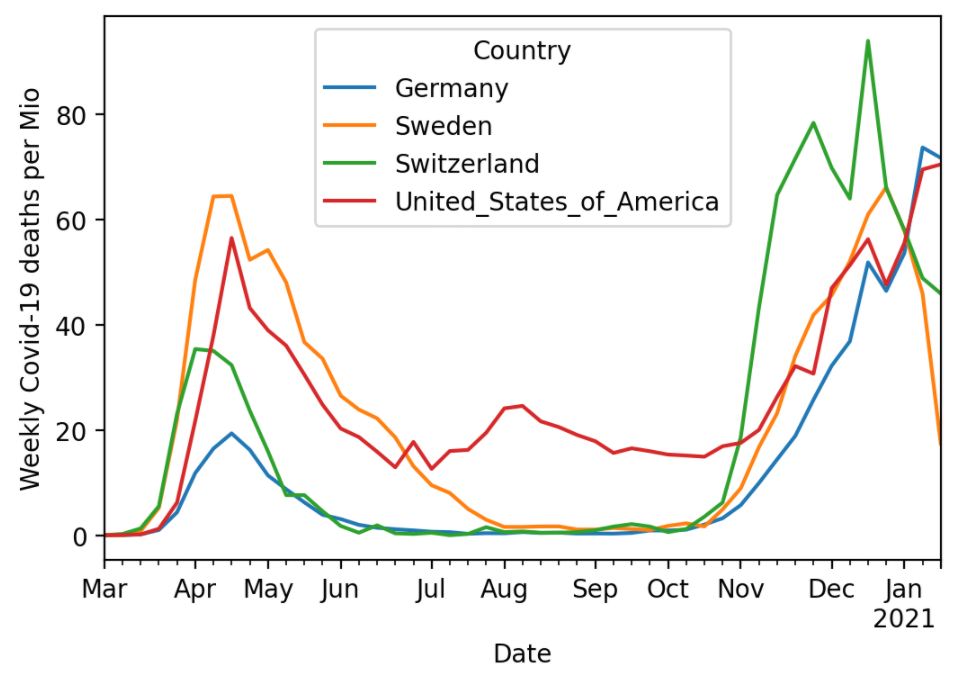
    In Post 2, we use a publicly available data of the European Centre for Disease Prevention and Control to calculate Covid-19 deaths per Mio persons over time and across countries . We will use slim Python and R codes to

    • fetch the data directly from the internet,
    • prepare and restructure it for plotting and
    • plot a curve per selected country.

    Note that different countries use different definitions of whom to count as Covid-19 death and these definitions might also have changed over time. So be careful with comparisons!

    library(tidyverse)
    
    # Source and countries
    link <- "https://opendata.ecdc.europa.eu/covid19/casedistribution/csv"
    countries <- c("Switzerland", "United_States_of_America", 
                   "Germany", "Sweden")
    
    # Import
    df0 <- read_csv(link)
    
    # Data prep
    df <- df0 %>%
      mutate(Date = lubridate::dmy(dateRep),
             Deaths = deaths_weekly / (popData2019 / 1e6))  %>%
      rename(Country = countriesAndTerritories) %>%
      filter(Date >= "2020-03-01",
             Country %in% countries)
    
    # Plot
    ggplot(df, aes(x = Date, y = Deaths, color = Country)) +
      geom_line(size = 1) +
      ylab("Weekly deaths per Mio") +
      theme(legend.position = c(0.2, 0.85))
    import pandas as pd
    
    # Source and countries
    url = "https://opendata.ecdc.europa.eu/covid19/casedistribution/csv"
    countries = ["Switzerland", "United_States_of_America", 
                 "Germany", "Sweden"]
    
    # Fetch data
    df0 = pd.read_csv(url)
    # df0.head()
    
    # Prepare data
    df = df0.assign(
        Date=lambda x: pd.to_datetime(x["dateRep"], format="%d/%m/%Y"),
        Deaths=lambda x: x["deaths_weekly"] / x["popData2019"] * 1e6,
    ).rename(columns={"countriesAndTerritories": "Country"})
    df = df.loc[
        (df["Country"].isin(countries)) & (df["Date"] >= "2020-03-01"),
        ["Country", "Date", "Deaths"],
    ]
    df = df.pivot(index="Date", columns="Country")
    df = df.droplevel(0, axis=1)
    
    # Plot
    ax = df.plot()
    ax.set_ylabel('Weekly Covid-19 deaths per Mio');

    Weekly Covid-19 deaths per Mio inhabitants as per January 26, 2021 (Python output).

    The code can be found on https://github.com/mayer79/covid with some other analyses regarding viruses.

  • Illustrating The Central Limit Theorem

    Lost in Translation between R and Python 1

    This is the first article in our series “Lost in Translation between R and Python”. The aim of this series is to provide high-quality R and Python 3 code to achieve some non-trivial tasks. If you are to learn R, check out the R tab below. Similarly, if you are to learn Python, the Python tab will be your friend.

    Let’s start with a little bit of statistics – it wont be the last time, friends: Illustrating the Central Limit Theorem (CLT).

    Take a sample of a random variable X with finite variance. The CLT says: No matter how “unnormally” distributed X is, its sample mean will be approximately normally distributed, at least if the sample size is not too small. This classic result is the basis to construct simple confidence intervals and hypothesis tests for the (true) mean of X, check out Wikipedia for a lot of additional information.

    The code below illustrates this famous statistical result by simulation, using a very asymmetrically distributed X, namely X = 1 with probability 0.2 and X=0 otherwise. X could represent the result of asking a randomly picked person whether he smokes. Conducting such a poll, the mean of the collected sample of such results would be a statistical estimate of the proportion of people smoking.

    Curiously, by a tiny modification, the same code will also illustrate another key result in statistics – the Law of Large Numbers: For growing sample size, the distribution of the sample mean of X contracts to the expectation E(X).

    # Fix seed, set constants
    set.seed(2006)
    sample_sizes <- c(1, 10, 30, 1000)
    nsims <- 10000
    
    # Helper function: Mean of one sample of X
    one_mean <- function(n, p = c(0.8, 0.2)) {
      mean(sample(0:1, n, replace = TRUE, prob = p))
    }
    # one_mean(10)
    
    # Simulate and plot
    par(mfrow = c(2, 2), mai = rep(0.4, 4))
    
    for (n in sample_sizes) {
      means <- replicate(nsims, one_mean(n))
      hist(means, breaks = "FD", 
           # xlim = 0:1, # uncomment for LLN
           main = sprintf("n=%i", n))
    }
    import numpy as np
    import matplotlib.pyplot as plt
    %matplotlib inline
    
    # Fix seed, set constants
    np.random.seed(100)
    sample_sizes = [1, 10, 30, 1000]
    nsims = 10_000
    
    # Helper function: Mean of one sample
    def one_mean(n, p=0.2):
        return np.random.binomial(1, p, n).mean()
    
    # Simulate and plot
    fig, axes = plt.subplots(2, 2, figsize=(8, 8))
    
    for i, n in enumerate(sample_sizes):
        means = [one_mean(n) for ell in range(nsims)]
        ax = axes[i // 2, i % 2]
        ax.hist(means, 50)
        ax.title.set_text(f'$n = {n}$')
        ax.set_xlabel('mean')
        # ax.set_xlim(0, 1)  # uncomment for LLN
    fig.tight_layout()

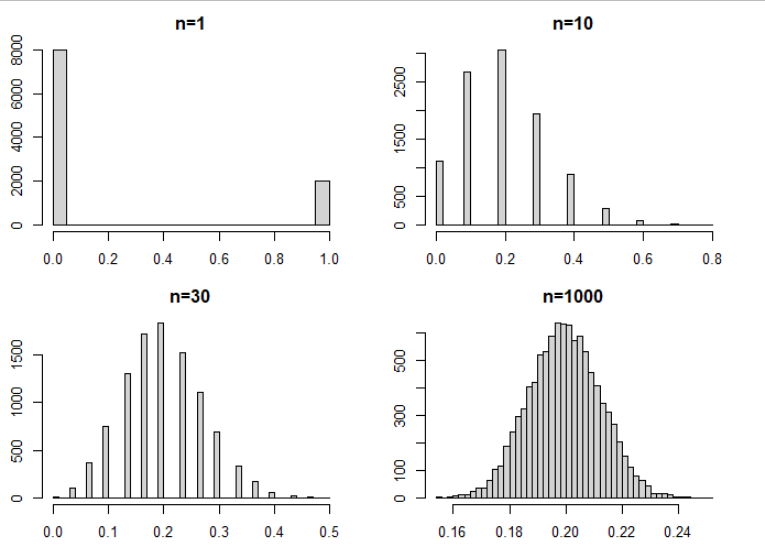
    Result: The Central Limit Theorem

    The larger the samples, the closer the histogram of the simulated means resembles a symmetric bell shaped curve (R-Output for illustration).

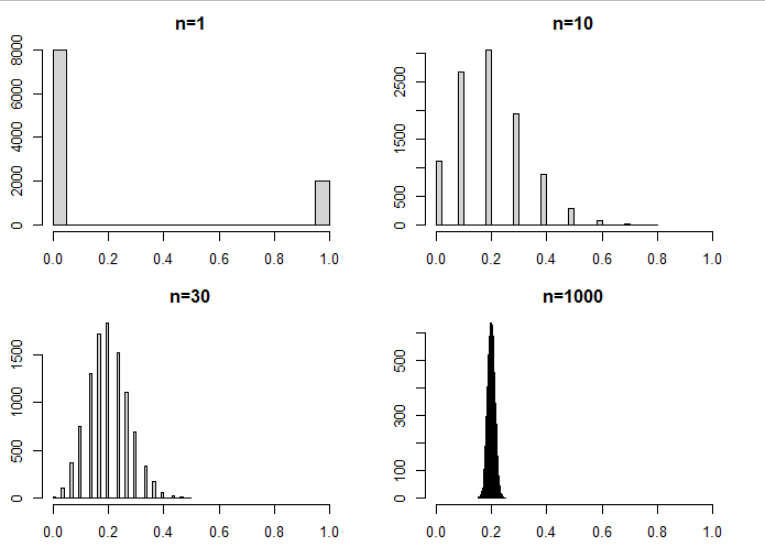
    Result: The Law of Large Number

    Fixing the x-scale illustrates – for free(!) – the Law of Large Numbers: The distribution of the mean contracts more and more to the expectation 0.2 (R-Output for illustration).

    See also the python notebook https://github.com/lorentzenchr/notebooks/blob/master/blogposts/2021-01-07 Illustrating The Central Limit Theorem.ipynb and for many great posts on R,  http://www.R-bloggers.com.